
Lead Tracking in ConstructionOnline™ gives construction companies a complete sales pipeline management system, purpose-built for the way builders and contractors actually win jobs. From the first inquiry through the signed contract, every interaction is captured and organized in one centralized platform. Build a pipeline that matches your sales process, schedule and track follow-ups, and maintain a complete history on each lead—so your team always knows which leads need to be prioritized next.
The Guide to Getting Started with Lead Tracking in ConstructionOnline walks through the main views you'll use day-to-day for lead management and shows you how to get existing & new leads into the platform.

Lead Pipeline View
The Lead Pipeline is where you add and manage all of your lead information. It provides a top-level picture of your sales process and lets you work through prospects quickly.
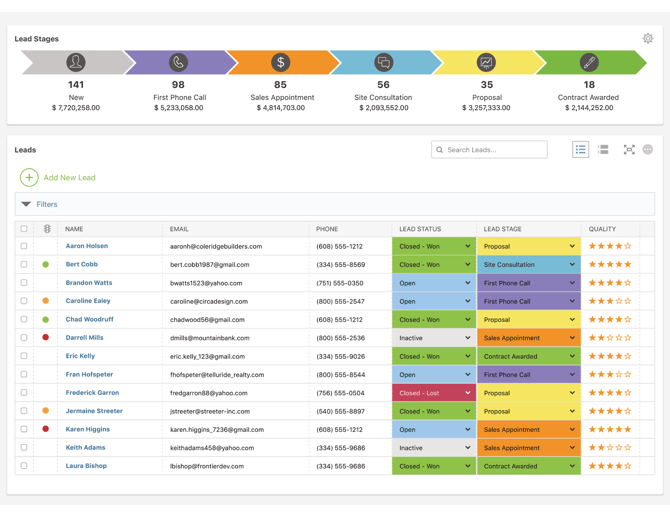
From the Lead Pipeline, you can:
- Define Custom Lead Stages: Build a pipeline that mirrors your sales process. In the summarized view, each stage displays a running count of leads and their combined total value in the pipeline.
- Add New Leads: Enter new leads into the system at any time using the Add New Lead option available here.
- Manage Leads In-Grid: Set Status, Stage, Quality Rating, and other fields for effective lead tracking, directly from the table—saving clicks and giving your team back valuable time with easy in-grid editing.
- Switch between List & Group-By Views: See your lead pipeline organized in the familiar list view table or customize your organization with ConstructionOnline's convenient group-by options.
- Search and Filter Leads: Quickly find specific leads or focus on a particular segment of your pipeline with ConstructionOnline's user-friendly search options and flexible filters.
Lead Calendar View
The Lead Calendar helps you stay on top of lead engagement by scheduling meetings, callbacks, and other lead activities.
In the Lead Calendar, you can:
- View Upcoming Lead Events: See what's planned for the coming Day, Week, or Month to make sure your sales team is prepared.
- Add New Events: Schedule meetings, callbacks, and other lead events to keep your pipeline moving.
- Track Weekly Calls: Stay on track with lead follow-up using ConstructionOnline's Weekly Call List which automatically compiles all scheduled callbacks and lets you check them off as they are completed.
- Filter by Sales Rep: Cut down on distractions and focus on your scheduled activities, or drill into an individual sales rep's activity to ensure team alignment around shared goals.
- Manage Completed Events: Toggle visibility of Completed Events on or off to keep your days focused on what needs attention moving forward.
Lead Details View
The Lead Details View allows you to drill into any individual lead, compiling all associated details about the prospect into a single, centralized location. 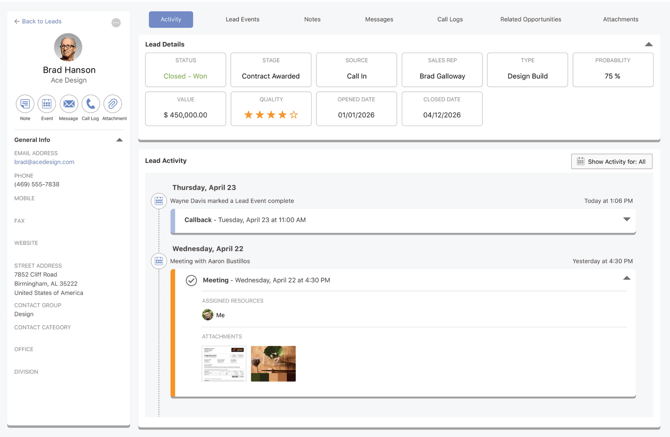
The Lead Details View includes:
- Lead Details Panel: Quickly reference key lead info, like Lead Status, Stage, Source, Sales Rep, Open/Close Dates, and more.
- Lead Activity Timeline: Access a chronological feed of everything related to the lead, including Latest Activity, Completed Events, and other communication.
- Tabs for Focused Work: Drill into Lead Events, Notes, Messages, Call Logs, Attachments, and more with user-friendly tabs for quick and easy navigation.
- Quick Actions: Log new activity with quick-add shortcuts for adding Notes, Events, Messages, Call Logs, and Attachments associated with the lead.
- At-a-Glance General Info: Easily access essential contact details, like email address, phone number, address, and more.
Lead Call Log View
The Lead Call Log gives your team a running record of every conversation with a lead, so the whole team stays aligned and up-to-date.
With the Lead Call Log, you can:
- Add Call Logs: Easily enter new Call Logs in real-time associating the related lead, call date, duration, and other relevant details.
- Capture Detailed Notes: Add additional context to logged conversations with flexible Call Notes, complete with bulleted talking points, numbered next steps, and more.
- Attach Associated Files: Include proposals, photos, or other reference docs directly alongside the relevant call.
- Edit Call Logs: Update notes, add attachments, or provide additional context at any time with full editing capabilities for Lead Call Logs.
- Find Call Records: Filter and search across your team's call history to easily see all conversations associated to a particular lead or including a particular keyword.
Getting Leads Into ConstructionOnline
ConstructionOnline provides 3 convenient methods for adding Leads to the Lead Pipeline:
- Capture Leads from the Web: Add a Lead Capture form to your Public Profile or your company website to let potential clients submit independent inquiries.
- Sync Leads with HubSpot: Connect ConstructionOnline + HubSpot to power-up your sales processes with automated lead creation and updates in both platforms.
-
Import Leads from Excel: Already have a list of leads? Use the Lead Import Template to format a .csv or .xlsx file to upload leads in a single action.
HAVE MORE QUESTIONS?
- Frequently asked questions (FAQs) about Lead Tracking can be found in the article FAQ: Lead Tracking.
- If you need additional assistance, chat with a Specialist by clicking the orange Chat icon located in the bottom left corner or visit the UDA support page for additional options.