
BACKGROUND
Bid Package Reminders in ConstructionOnline offer significant benefits, helping users to streamline the bid management process. Setting automated reminders for events such as upcoming bid submission deadlines and past-due submissions allows companies to keep bidders informed and engaged throughout the bidding process, ensuring timely responses and reducing the risk of procurement delays. This also keeps internal team members aligned on the status of active Bid Packages, supporting a more competitive and efficient bidding process.
BEST PRACTICE RECOMMENDATION
To streamline the creation of reminders for individual Bid Packages in ConstructionOnline, we recommend that you complete the initial setup of Bid Package reminders within the Company's Bid Package Reminder Settings.
HOW TO CREATE REMINDERS FOR BID PACKAGES
A. During Bid Package Creation:
- Reminders for individual Bid Packages can be set up during the Bid Package creation process:
- Once your within the "Create Bid Package" extension blade that opens on the right side of your screen, navigate to the "Reminder Recipients" tab.
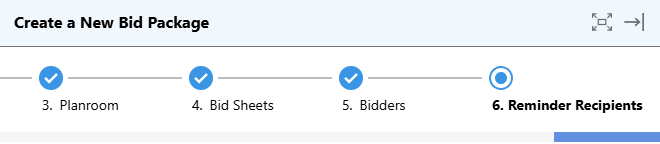
- From here, you can set up reminders for -
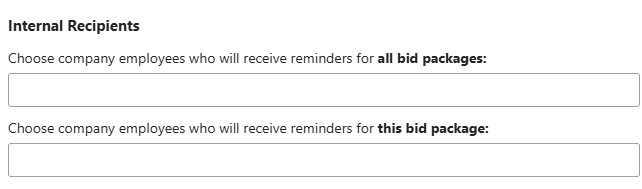
- Internal Recipients: Company Users in your ConstructionOnline account.
- For all Bid Packages
- For the specific Bid Package being created
- External Recipients: Any Contacts within your ConstructionOnline account.
- For the specific Bid Package being created
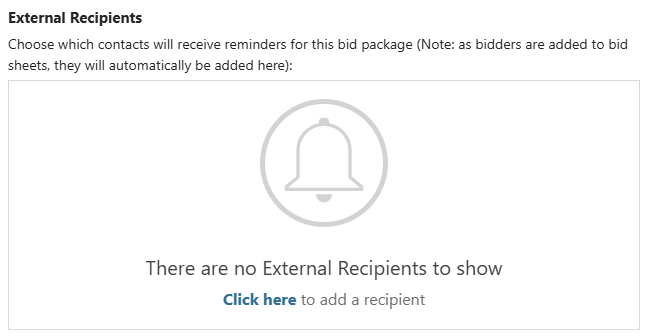
- When a contact is added as a bidder on any Bid Sheet within the Bid Package, they will be added as an External Reminder Recipient.
🗒️ Note: The automated email reminders being sent to the chosen recipients are those that have been configured within your Bid Package Reminder Settings. You can modify these reminders by clicking the blue "your reminder settings" text.
- When a contact is added as a bidder on any Bid Sheet within the Bid Package, they will be added as an External Reminder Recipient.
- For the specific Bid Package being created
- Internal Recipients: Company Users in your ConstructionOnline account.
- Set the Reminders by clicking the blue "Save" button.
B. From within an Existing Bid Package:
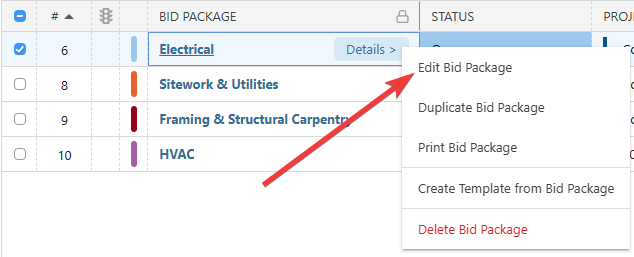
- From within your "Bid Packages" list, hover over the desired Bid Package and either press the blue "Details >" button or right-click and select "Edit Bid Package" from the dropdown menu.
- Follow Steps 2-4 from the section above.
ADDITIONAL INFORMATION
- Subscription Level: Bid Tracking is available for ConstructionOnline accounts with active subscriptions at the Residential Business, Commercial Team and Business, Multi-Family Team and Business, and Enterprise levels.
- The Bid Tracking feature is also available as a Per-Company Add-On for all other plans.
- Permissions: Admin Users and Company Users with "Can Create, Edit, & Delete" Bid Tracking permissions are able to create reminders for Bid Packages.
- CO™ Mobile App: The Bid Tracking feature is currently available exclusively via browser access to ConstructionOnline.
HAVE MORE QUESTIONS?
- Frequently asked questions (FAQ) about Bid Tracking can be found in the article FAQ: Bid Tracking.
- If you need additional assistance, chat with a ConstructionOnline Specialist by clicking the orange Chat icon in the bottom left corner or visit the UDA Support Page for more options.