
BACKGROUND
ConstructionOnline's Redline™ Planroom allows construction teams to store, organize, and share up-to-date plan sets with clients and subcontractors through the ClientLink and TeamLink Portals. In addition to sharing sheets globally with all portal users, teams can designate specific ClientLink and/or TeamLink Users to view individually selected sheets—giving greater control over plan visibility and access on a per-user basis.
THINGS TO CONSIDER
-
ClientLink and TeamLink permissions must be configured to allow Redline Planroom viewing in order for individually shared sheets to be visible to designated users. For more information about managing ClientLink and/or TeamLink permissions, click here.
-
This process can be completed for a single sheet or multiple sheets simultaneously.
HOW TO SHARE REDLINE SHEETS WITH INDIVIDUAL CLIENTLINK OR TEAMLINK USERS
-
Navigate to the Redline Planroom feature from within the desired Project.
- Locate the sheet(s) you would like to share.
- For a single sheet: hover over the desired sheet and click the gray 3-dot Action Menu
 to right.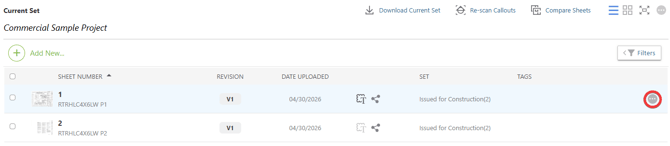
- For multiple sheets: check the boxes to the left of the desired sheets, then right-click.
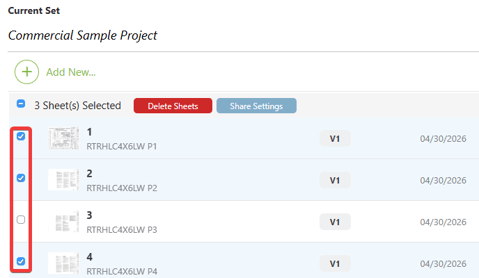
- For a single sheet: hover over the desired sheet and click the gray 3-dot Action Menu
- Hover over the "Share" option in the dropdown menu and select either "ClientLink" or "TeamLink."
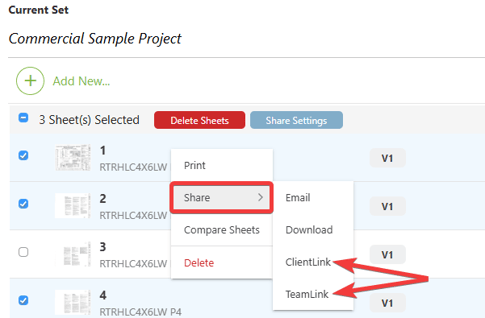
- In the "Shared Selected Sheets" window, select "Share with selected [ClientLink/TeamLink] users" option.
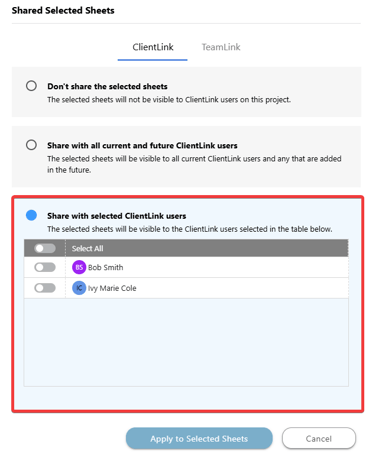
- Toggle on the individual users you would like to grant access to from the corresponding user list.
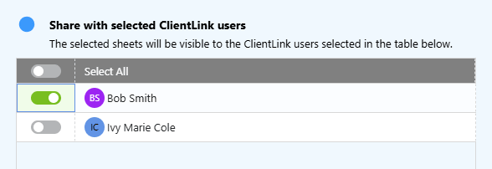
- Click the blue "Apply to Selected Sheets" button to save your sharing preferences and apply them to all selected sheets.
ADDITIONAL INFORMATION
-
Subscription Level: Redline Planroom is available for active ConstructionOnline™ Residential, Commercial, Specialty & Subs, and Multi-Family subscriptions.
-
Permissions: Admin Users and Company Users with Redline Planroom permissions set to "Can Add, Update, & Delete Plans " can share Redline Sheets with ClientLink and/or TeamLink Users.
-
CO™ Mobile App: Users with the appropriate permissions can share Redline Sheets with individual ClientLink and/or TeamLink Users directly from the ConstructionOnline Mobile App.
HAVE MORE QUESTIONS?
- Frequently asked questions (FAQs) about Redline Planroom can be found in the article FAQ: Redline Planroom.
- If you need additional assistance, chat with a ConstructionOnline Specialist by clicking the orange Chat icon in the bottom left corner or visit the UDA Support Page for more options.