
BACKGROUND
Bid deadlines don't wait for subcontractors who are struggling with technology, stuck on a jobsite, or juggling multiple bid requests. When a critical sub calls with their numbers close to the deadline or simply can't navigate to their email, you shouldn't feel forced to leave the Bid Package as incomplete or adjust the deadline for everyone.
ConstructionOnline allows authorized users to enter a bid on behalf of a Bidder, ensuring that every invitation is accurately represented and tracked—even when circumstances prevent the subcontractor from submitting directly.
THINGS TO CONSIDER
- You must add the Bidder to the desired Bid Sheet before being able to enter a bid on their behalf.
- When you enter bid for a Bidder, their invite email automatically updates to display that a bid has been submitted for them.
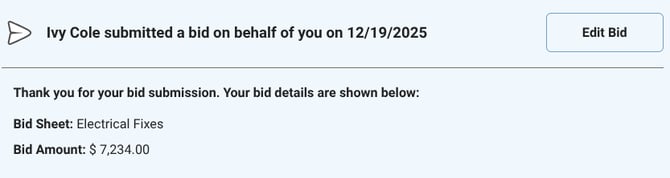
- Before the submission deadline, you and the Bidder can undo the bid intention or make changes to the bid information.
HOW TO ENTER A BID ON BEHALF OF A BIDDER
- From within your "Bid Packages" list, locate and select the desired Bid Package for the Bidder you are submitting on behalf of.
- Navigate to the "Bidders" tab.

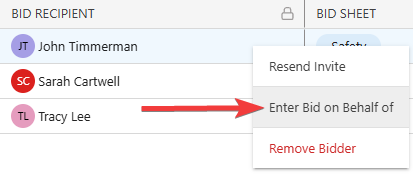
- Find the Bidder, verify that the row belongs to the correct Bid Sheet for submission, and right-click on their name.
- Choose the "Enter Bid on Behalf of" option from the dropdown menu.
- The "You Are Entering a Bid on Behalf of: [Bidders Name]" window will open, where you can set the bid intention and enter the bid values, inclusions, and exclusions.
- Once all desired bid information has been entered, select either the blue "Submit" or "Save for Later" button.
- If you select to submit the bid, ConstructionOnline will require double-verification. Click the blue "Submit Bid" button to confirm the bid.
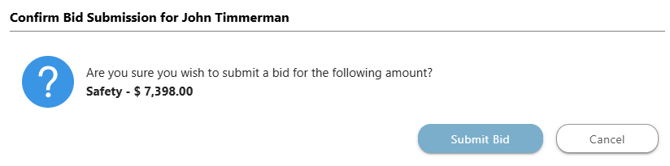
- If you select to submit the bid, ConstructionOnline will require double-verification. Click the blue "Submit Bid" button to confirm the bid.
ADDITIONAL INFORMATION
- Alternative Access Points: You can also enter a bid on behalf of a Bidder by editing an existing Bid Package or from the "Bidders" tab within the Bid Tracking feature.
- Subscription Level: Bid Tracking is available for ConstructionOnline accounts with active subscriptions at the Residential Business, Commercial Team and Business, Multi-Family Team and Business, and Enterprise levels.
- The Bid Tracking feature is also available as a Per-Company Add-On for all other plans.
- Permissions: Admin Users and Company Users with "Can Create, Edit, and Delete" permissions for Bid Tracking can enter bids on behalf of Bidders.
- CO™ Mobile App: The Bid Tracking feature is currently available exclusively via browser access to ConstructionOnline.
HAVE MORE QUESTIONS?
- Frequently asked questions (FAQ) about Bid Tracking can be found in the article FAQ: Bid Tracking.
- If you need additional assistance, chat with a ConstructionOnline Specialist by clicking the orange Chat icon in the bottom left corner or visit the UDA Support Page for more options.