
BACKGROUND
Once Labor Expense line items are linked to the Project Estimate, their costs can be viewed directly alongside the corresponding estimated work.
In ConstructionOnline's OnCost™ Estimating, the Labor Expense Cost column displays linked labor costs at the appropriate Estimate Category, Subcategory, and/or Line Item. Each populated value can also be traced back to the specific Labor Expense record of origin, giving construction teams a transparent, detailed view of actual labor costs—without having to navigate away from the Estimate.
THINGS TO CONSIDER
- Enable the Labor Expense Cost column within the Show/Hide Columns menu for the Estimate. Column preferences are saved per view. The system remembers saved view preferences from session to session.
- The Labor Expense Cost column reflects only Labor Expense items that have been linked to the Estimate. See Link Labor Expense Items to an Estimate.
- When multiple Labor Expense items are linked to the same line item within the Estimate, the Labor Expense Cost column displays the sum of their totals.
- Values cannot be directly entered into the Labor Expense Cost column. A Labor Expense record must be created and linked to the Estimate for values to populate to the Labor Expense Cost column.
Labor Expense items not linked to the Estimate will appear in the Unlinked Labor Expense Total row within the Unlinked Purchasing Totals section of the Estimate.
HOW TO VIEW LABOR EXPENSES IN AN ESTIMATE
- Within the target Project Estimate,
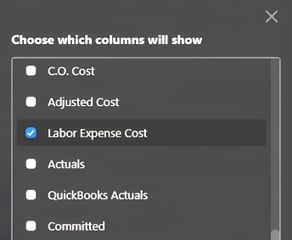 verify that the Labor Expense Cost column is displayed.
- Open the Show/Hide Columns menu and check the box next to "Labor Expense Cost."
- When enabled, the Labor Expense Cost column will appear in the main Project Totals table, as well as on the detailed Category and Subcategory sheets of the Estimate.
- Values will show automatically where linked Labor Expense Costs exist. Items without linked Labor Expense Costs will show a zero value ($0.00) by default.
- To trace a Labor Expense Cost to the Labor Expense record of origin, click on any cell within the Labor Expense Cost column that shows a non-zero value.
- A window displaying Related Labor Expenses will open, listing any and all Labor Expenses linked to the selected row or cell.

- Select the Labor Expense you wish to view and/or edit, then click the blue "Go to Labor Expense" button.
- The selected Labor Expense will open, giving you access to the record's Timeline, Details, Link to Estimate, Payments, and Attachments. See Edit a Labor Expense.
💡 Pro Tip: When the Labor Expense Cost column is shown within the Estimate view, it will also be included in any Estimate Export for Reference and populated at every associated level of detail.
ADDITIONAL INFORMATION
- Subscription Level: Access to the Labor Expenses feature and subsequent Labor Expenses data is available for any active ConstructionOnline subscription with access to OnCost Purchasing, whether included at the Team, Business, and Enterprise levels or as a Per-Company Add-On.
- Permissions: Access to OnCost Estimating follows the Company User's permissions for Estimating. Access to Labor Expenses follows the Company User's permissions for Expenses & Receipts in OnCost Purchasing.
HAVE MORE QUESTIONS?
- If you need additional assistance, chat with a ConstructionOnline Specialist by clicking the orange Chat icon in the bottom left corner or visit the UDA Support Page for more options.