
BACKGROUND
Recording a Labor Expense captures the cost. Linking the Labor Expense to the Project Estimate determines where that cost is accounted for within the project's financial structure.
In ConstructionOnline, each line item on a Labor Expense can be associated with the appropriate Category, Subcategory, and/or Line Item within the Estimate. This ensures labor costs are attributed to the work they support, allowing job costing to show how actual labor expenses compare against the corresponding estimated costs—rather than being grouped in a separate, unallocated total.
THINGS TO CONSIDER
- The option to Link to Estimate is only available for Labor Expenses when the associated Project has an existing Estimate.
- Line items can be linked when creating a Labor Expense (whether creating from Scratch or from Time Tracking Shifts) and any time after creation from the Edit a Labor Expense blade.
- Linking line items to the Estimate is optional, although recommended. The Link to Estimate table lists every line item included on the Labor Expense. Only values from linked items will be available to view within the Estimate.
HOW TO LINK LABOR EXPENSE ITEMS TO AN ESTIMATE
- Open the Link to Estimate view on a Labor Expense, accessible from 3 locations:
- When creating a Labor Expense from Time Tracking Shifts—click the Link to Estimate button
- When creating a Labor Expense from Scratch—select the Link to Estimate tab
- When editing a Labor Expense anytime after creation—navigate to the Link to Estimate tab
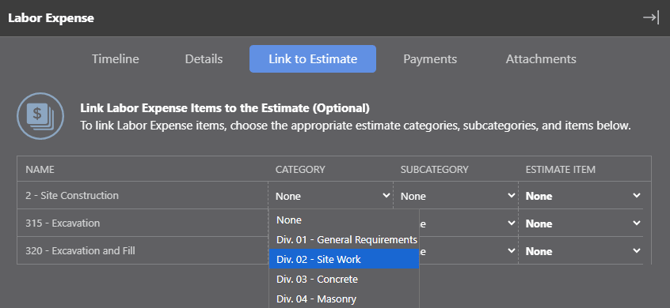
- Review the Link to Estimate table, where every line item included on the Labor Expense will be listed. (Line Item Formatting selected during Labor Expense creation determines how costs are presented.)
- Use the dropdown menus (Category, Subcategory, Estimate Item) to select the location the item should be linked to within the Estimate
- The Estimate Item column will highlight green to confirm item linkage.
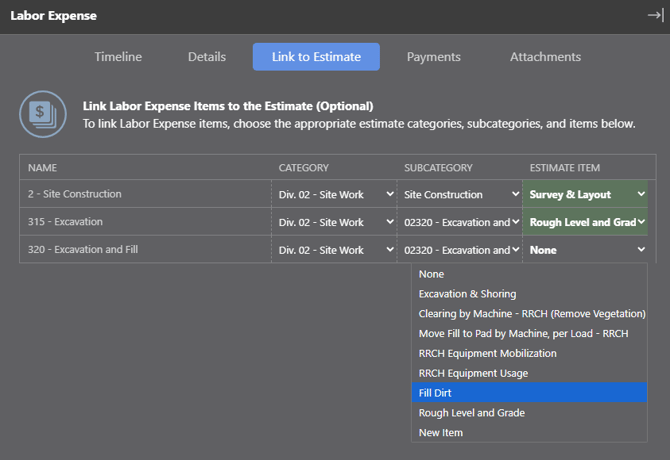
- The Estimate Item column will highlight green to confirm item linkage.
- Press the blue "Save and Continue" or "Save" button to confirm estimate links.
- From Labor Expense creation wizard, "Save and Continue" will complete estimate linking and take you to the next step—"Mark as Paid."
- From Labor Expense editing blade, "Save" will complete estimate linking, close the edit blade, and return you to the Labor Expense table in Purchasing.
📌 The level of detail available when linking a Labor Expense to the Project Estimate is determined by the structure of the Estimate.
-
Advanced (3-level) Estimates: Category, Subcategory, Line Item
-
Simple (2-level) Estimates: Category, Subcategory only
ADDITIONAL INFORMATION
- Subscription Level: The Labor Expenses feature is available for any active ConstructionOnline subscription with access to OnCost Purchasing, whether included at the Team, Business, and Enterprise levels or as a Per-Company Add-On.
- Permissions: Admin Users and Company Users with "Can Create & Edit" or "Can Create, Edit, & Delete" Expenses & Receipts permissions can link items from Labor Expenses to Project Estimates.
HAVE MORE QUESTIONS?
- If you need additional assistance, chat with a ConstructionOnline Specialist by clicking the orange Chat icon in the bottom left corner or visit the UDA Support Page for more options.