
BACKGROUND
For construction companies, efficiently managing and communicating with external partners is crucial. In ConstructionOnline, you can quickly view the specific individuals associated with each company in your directory, ensuring that the right people can be contacted for the right reasons, saving time and improving collaboration.
HOW TO VIEW CONTACTS ASSOCIATED WITH A COMPANY
- From the "Companies" portion of your Company Directory, hover over the desired Company and press the blue "Details>" button.
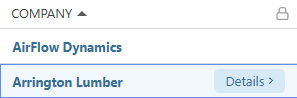
- This will open the Company's extension blade on the right side of your screen.
- Navigate to the "Contacts" tab to see the Contact(s) associated with that Company.

ADDITIONAL INFORMATION
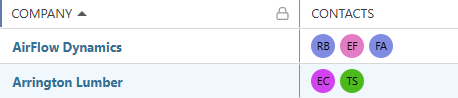
- Alternative Access Point: You may also view the Contacts associated with the Companies in your "Companies" List by viewing the "Contacts" column within the dynamic table.
- Subscription Level: The Company Directory is available for all ConstructionOnline subscriptions.
- Permissions: Admin Users and Company Users have access to the Company Directory.
- CO™ Mobile App: Company Users can view Contacts associated with a Company via the ConstructionOnline Mobile App.
HAVE MORE QUESTIONS?
- Frequently asked questions (FAQ) about Companies can be found in the article FAQ: Companies.
- If you need additional assistance, chat with a ConstructionOnline Specialist by clicking the orange Chat icon in the bottom left corner or visit the UDA Support Page for more options.