
In construction, accurate pricing is essential to maintaining profitability and client trust. From custom upgrades to material substitutions, client selections directly influence project budgets—and even small miscalculations can lead to significant cost discrepancies over time. Without consistent markup settings, companies risk inconsistent margins, manual recalculations, and potential revenue loss.
ConstructionOnline's Selection Choice Markup Settings for Client Selections deliver a structured, scalable solution for managing markups across every level of your business. Selection Markup Settings function similarly to Project Tax Settings, allowing companies to establish organization-wide markup standards while providing the flexibility to adjust those settings for individual projects or selection choices as needed.
THINGS TO CONSIDER
- Only Admin Users and Company Users with "Can Create, Edit, and Delete" Client Selections permissions can manage Selection Choice Markup Settings.
- To manage or modify Selection Choice Markup Settings at the Company or Project Level, the "Apply default markup to selection choices" checkbox must be selected.
Markup Type Options
ConstructionOnline supports multiple Markup Types for Client Selections, giving companies the flexibility to match their unique pricing models:
- $ Flat Dollar: Adds a fixed dollar amount to the selection total
- % Percent: Calculates markup as a percentage of the total cost, following the Project's Tax/Markup calculation method:
- Tax then Markup: Markup is calculated on Total Cost + Tax amount
- Markup then Tax or Tax and Markup Separate: Markup is calculated on Total Cost only
- $/Unit: Applies markup per unit of quantity, providing flexibility for material or quantity-based selections
Hierarchical Default Settings
Selection Choice Markup Settings provide a clear hierarchy for customization and control:
- Company-Level Defaults: Establish baseline markup settings for all new projects created within the Company Account.
- Account Settings Menu > "Financial Settings" > "Selection Markup"
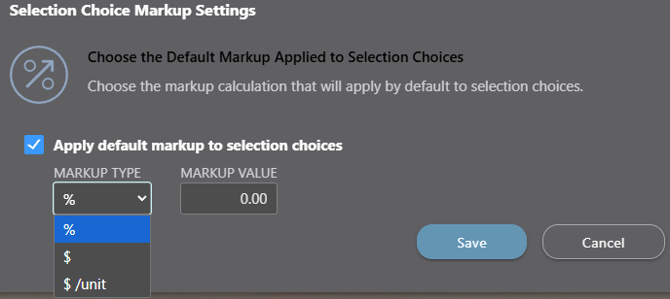
- Account Settings Menu > "Financial Settings" > "Selection Markup"
- Project-Level Overrides: Individual Project Markup Settings can override company-level defaults with unique Markup Settings tailored to specific job requirements.
- Desired Project > Client Selections > "Selections" List Gray 3-dot Action Menu
 > "Total Markup"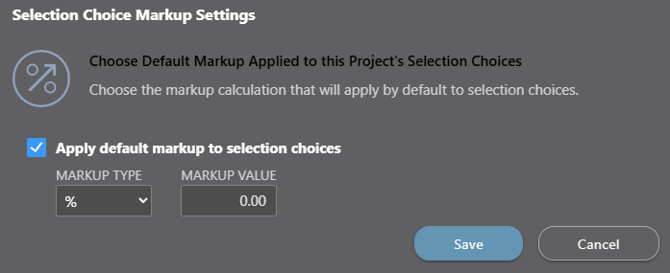
- Desired Project > Client Selections > "Selections" List Gray 3-dot Action Menu
- Selection-Level Customization: Markup for individual Selection Choices can be configured independently during creation for maximum flexibility.
- Desired Project > Client Selections > Add Selection Choice > "Markup & Price" tab
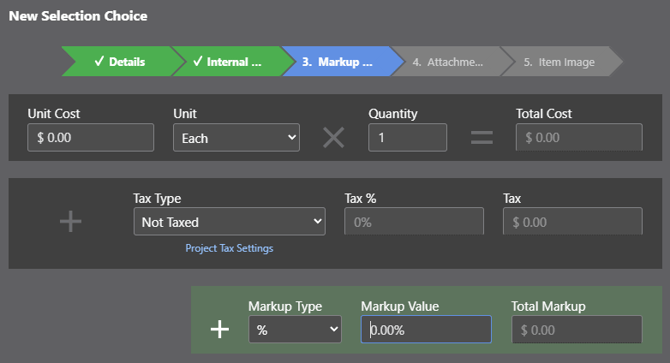
- Desired Project > Client Selections > Add Selection Choice > "Markup & Price" tab
🗒️ Note: After managing Selection Choice Markup Settings at the Company, Project, or Selection level, select the blue "Save" button to apply the updated markup configuration.
ADDITIONAL INFORMATION
- Subscription Level: Client Selections are available for all companies with active ConstructionOnline subscriptions.
- Permissions: Admin Users and Company Users with "Can Create, Edit, and Delete" Client Selection Permissions can manage Selection Choice Markup Settings.
- CO™ Mobile App: The Client Selections feature is available via the mobile app. However, managing Selection Markup Settings is exclusively available via browser access to ConstructionOnline.
HAVE MORE QUESTIONS?
- Frequently asked questions (FAQ) about Client Selections can be found in the article FAQ: Client Selections.
- If you need additional assistance, chat with a ConstructionOnline Specialist by clicking the orange Chat icon in the bottom left corner or visit the UDA Support Page for more options.