
BACKGROUND
Effective management of company contacts and details is crucial for any construction operation. While Excel has traditionally served as a common tool for this, centralizing company contact information within ConstructionOnline offers significant advantages. Bringing company data into the system provides seamless integration with other features, ultimately enhancing communication and streamlining workflows. However, the transition from Excel often presents manual data entry. ConstructionOnline addresses this by providing an import option, allowing you to quickly and accurately transfer your company data from an Excel file.
HOW TO IMPORT COMPANIES
- From the "Companies" portion of your Company Directory, click the gray 3-dot Action Menu
 in the upper right-hand corner of the "Companies" List.
 - Press the "Import Companies" option within the dropdown menu.
- Select the "Choose File" button to upload your Companies directly from an Excel file on your device.
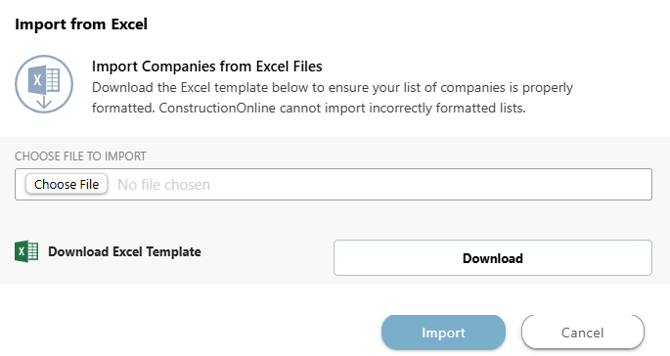
- If you have not yet entered your companies into an Excel spreadsheet, but would like to enter them into the system this way, hit the "Download" button to download an Excel template to your device.
- Click the blue "Import" button to import your Companies into ConstructionOnline.
- Once successfully imported, these Companies will appear within the "Companies" List.
ADDITIONAL INFORMATION
- Subscription Level: The Company Directory is available for all ConstructionOnline subscriptions.
- Permissions: Admin Users and Company Users can import Companies.
- CO™ Mobile App: The Companies feature is available via the mobile app. However, the import option for Companies is exclusively available through browser access to ConstructionOnline.
HAVE MORE QUESTIONS?
- Frequently asked questions (FAQ) about Companies can be found in the article FAQ: Companies.
- If you need additional assistance, chat with a ConstructionOnline Specialist by clicking the orange Chat icon in the bottom left corner or visit the UDA Support Page for more options.