
BACKGROUND
Companies in ConstructionOnline™ allow users to organize contacts under a shared company record, making it easier to manage relationships, track project associations, and maintain accurate contact information across your directory. The "Companies" List can be exported to Excel for use outside of the platform.
THINGS TO CONSIDER
- Any sort or filter settings currently applied to the Companies table will be reflected in the exported file.
HOW TO EXPORT COMPANIES TO EXCEL
-
Navigate to the Companies portion of your Company Contact Directory.
- Click the gray 3-dot Action Menu
 at the top-right of the Companies table and select the "Export to Excel" option from the dropdown menu.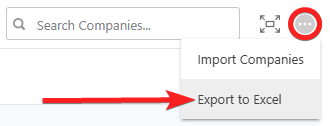
- This will automatically download the "Companies" List to your device as an Excel file ("Companies.xlsx").

- This will automatically download the "Companies" List to your device as an Excel file ("Companies.xlsx").
ADDITIONAL INFORMATION
- Subscription Level: The Company Directory is available for all ConstructionOnline subscriptions.
- Permissions: Admin Users and Company Users can export the Company Account's "Companies" List to Excel.
- CO™ Mobile App: The Companies feature is available via the mobile app. However, the export option for a Company Account's "Companies" List is exclusively available through browser access to ConstructionOnline.
HAVE MORE QUESTIONS?
- Frequently asked questions (FAQ) about Companies can be found in the article FAQ: Companies.
- If you need additional assistance, chat with a ConstructionOnline Specialist by clicking the orange Chat icon in the bottom left corner or visit the UDA Support Page for more options.