
BACKGROUND
In construction, the information surrounding your partners and stakeholders is rarely static. Contact details change, addresses need updating, service offerings evolve, and internal classifications may need adjustments. The ease of modifying this information in your construction management software is, therefore, crucial for maintaining accurate and up-to-date records. ConstructionOnline's option to edit a company's details ensures that your central company directory remains a reliable and current resource, preventing communication breakdowns, streamlining workflows, and ultimately contributing to more efficient and successful project management.
HOW TO EDIT A COMPANY
- From the "Companies" portion of your Company Directory, hover over the desired Company and press the blue "Details>" button.
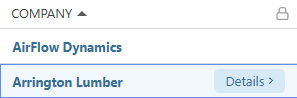
- The Company's extension blade will open on the right side of your screen, where you can make the desired changes within each tab -

- Details: General Company information
- Contacts: Contact(s) associated with the Company
- Attachments: Pertinent files and/or photos
- Click the blue "Save" button to finalize the changes made to the Company.
ADDITIONAL INFORMATION
- Alternative Access Point: You may also edit a Company by clicking the desired category column within its row on the dynamic table in the "Companies" List.
- Subscription Level: The Company Directory is available for all ConstructionOnline subscriptions.
- Permissions: Admin Users and Company Users can edit Companies.
- CO™ Mobile App: Company Users can edit existing Companies via the ConstructionOnline Mobile App.
HAVE MORE QUESTIONS?
- Frequently asked questions (FAQ) about Companies can be found in the article FAQ: Companies.
- If you need additional assistance, chat with a ConstructionOnline Specialist by clicking the orange Chat icon in the bottom left corner or visit the UDA Support Page for more options.