
BACKGROUND
Duplicating a Bid Sheet allows you to quickly create a new sheet with the same structure and details as an existing one, saving time when multiple similar Bid Sheets within a Bid Package are needed.
⚠️ Important: Duplicating a Bid Sheet will not copy any Bidders from the original Bid Sheet. You will need to add Bidders to the new sheet separately.
HOW TO DUPLICATE A BID SHEET
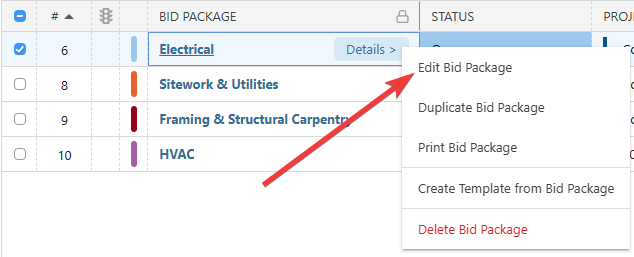
- From within your "Bid Packages" list, locate the desired Bid Package with the Bid Sheet you wish to duplicate.
- Right-click on the package and select the "Edit Bid Package" option from the dropdown menu.
- Navigate to the "Bid Sheets" tab.

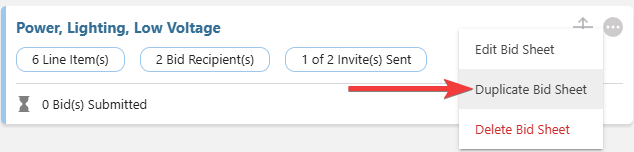
- Right-click on or select the gray 3-dot Action Menu of desired Bid Sheet and select the "Duplicate Bid Sheet" option from the dropdown menu.
- The "Create a New Bid Sheet for [Bid Package Name]" extension blade will open on the right side of your screen, where you can confirm or update Bid Sheet details for the new sheet.
- Click the blue "Save" button to finalize the new Bid Sheet.
- This will create a duplicate Bid Sheet with the updated details.
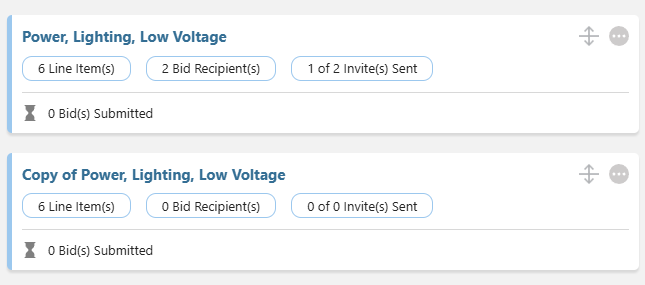
- This will create a duplicate Bid Sheet with the updated details.
ADDITIONAL INFORMATION
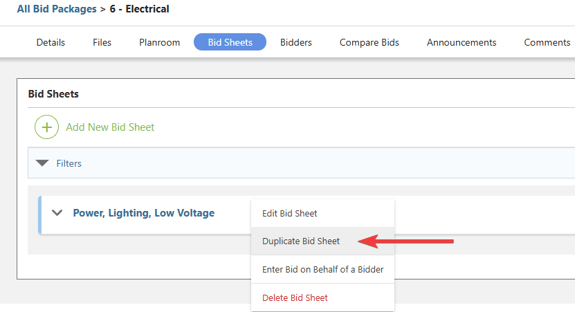
- Alternative Access Point: You can also duplicate Bid Sheets by clicking on the desired Bid Package and right-clicking on the desired Bid Sheet within the "Bid Sheets" tab.
- Subscription Level: Bid Tracking is available for ConstructionOnline accounts with active subscriptions at the Residential Business, Commercial Team and Business, Multi-Family Team and Business, and Enterprise levels.
- The Bid Tracking feature is also available as a Per-Company Add-On for all other plans.
- Permissions: Admin Users and Company Users with "Can Create, Edit, and Delete" permissions for Bid Tracking can duplicate Bid Sheets.
- CO™ Mobile App: The Bid Tracking feature is currently available exclusively via browser access to ConstructionOnline.
HAVE MORE QUESTIONS?
- Frequently asked questions (FAQ) about Bid Tracking can be found in the article FAQ: Bid Tracking.
- If you need additional assistance, chat with a ConstructionOnline Specialist by clicking the orange Chat icon in the bottom left corner or visit the UDA Support Page for more options.