
THINGS TO CONSIDER
- Bid Packages can be accessed at both the Company and Project/Opportunity levels:
- Company-Level: Displays all Bid Packages across all projects.
- Project/Opportunity-Level: Displays only Bid Packages associated with the selected Project or Opportunity.
BACKGROUND
A well-configured Bid Package—with the right documents, scope of work, instructions, and other details—is a valuable asset that shouldn't disappear once bids are awarded. These structured packages can serve as templates for future work, saving time and preventing the duplication of effort.
ConstructionOnline makes it easy to turn any existing Bid Package into a reusable template in just a few clicks. This preserves proven bidding structures, ensures future Bid Packages benefit from past work, and maintains the flexibility to update project-specific details as needed.
HOW TO CREATE A BID PACKAGE TEMPLATE FROM AN EXISTING BID PACKAGE
- From within your "Bid Packages" list, right-click on the desired Bid Package you would like to use to create the Bid Package Template.
- Choose the "Create Template from Bid Package" option from the dropdown menu.
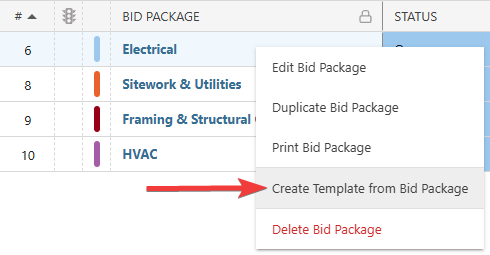
- This will open the "New Template from [Bid Package Name]" extension blade on the right side of your screen, where you can confirm and edit any of the existing Bid Package's information for the new template.
- Check out "Create a New Bid Package from a Template" to learn more about the Bid Package fields that ConstructionOnline will populate in the template.
- Hit the blue "Save" button to create the Bid Package Template for later use.
⚠️ Important: Bid Package Templates do not send bid invitation emails.
ADDITIONAL INFORMATION
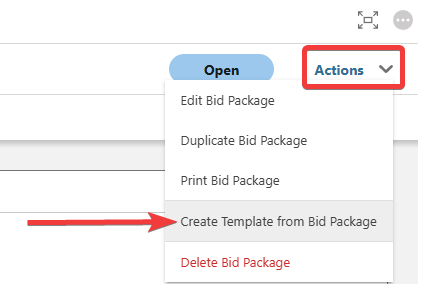
- Alternative Access Point: You can also create Bid Package Templates from existing Bid Packages by clicking on the desired package and selecting "Create Template from Bid Package" from the blue "Actions" dropdown menu.
- Subscription Level: Bid Tracking is available for ConstructionOnline accounts with active subscriptions at the Residential Business, Commercial Team and Business, Multi-Family Team and Business, and Enterprise levels.
- The Bid Tracking feature is also available as a Per-Company Add-On for all other plans.
- Permissions: Admin Users and Company Users with "Can Create, Edit, and Delete" permissions for Bid Tracking can create Bid Package Templates from existing Bid Packages.
- CO™ Mobile App: The Bid Tracking feature is currently available exclusively via browser access to ConstructionOnline.
HAVE MORE QUESTIONS?
- Frequently asked questions (FAQ) about Bid Tracking can be found in the article FAQ: Bid Tracking.
- If you need additional assistance, chat with a ConstructionOnline Specialist by clicking the orange Chat icon in the bottom left corner or visit the UDA Support Page for more options.