
BACKGROUND
In construction, success hinges on seamless collaboration and clear communication among diverse stakeholders. Since individuals frequently shift roles and responsibilities throughout a project's lifecycle or across multiple projects, ConstructionOnline addresses this dynamic reality by allowing users to adjust a contact's type within the platform.
Whether a prospective client becomes a project stakeholder or a subcontractor transitions into a key team member, this flexible contact conversion eliminates duplicate entries, manual deletions, or lost historical data. This ensures contact information is always accurate and relevant, ultimately streamlining workflows, improving communication, and enabling more informed decision-making.
THINGS TO CONSIDER
Only certain Contacts can be converted from one type to another:
- Basic Contacts → Leads when someone enters your sales pipeline
- Leads → ClientLink Users when they become a client
- This conversion process differs from the others. You can convert a Lead to a ClientLink Contact either when converting the Lead's associated Opportunity into a Project, or by adding the Lead to a Project Team as a ClientLink Contact.
- ClientLink Users → Leads when a previous client re-enters your sales pipeline for new Opportunities
- ClientLink ↔ TeamLink when roles shift between Projects
- Company Employees → Company Admins when elevated permissions are needed
🗒️ Note: Check out the "Essential Guide to Contacts in ConstructionOnline™" for more information regarding each type of Contact.
HOW TO CONVERT A CONTACT TYPE
- Access the "Team Management" tab through the Left Sidebar or the Company Selector in the Top Navigation Bar.
- Under the "Contacts & Companies" section, select "Contacts."
- This will open your Company Contacts List.
- Right-click on the desired Contact.
- Select the "Convert to..." option from the dropdown menu.
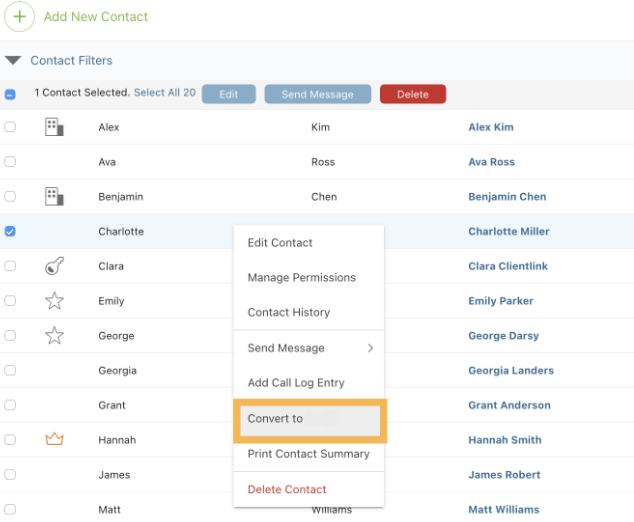
- If converting a Company Contact into an Admin, the option will appear as "Make Contact an Admin."
🗒️ Note: If you do not see these options to convert the Contact, it is likely that the conversion is not possible.
- If converting a Company Contact into an Admin, the option will appear as "Make Contact an Admin."
- Within the window that appears, follow the steps and press the blue "Save" button to complete the conversion of the Contact's Type.
- The Contact's badge will automatically update to reflect the change.
ADDITIONAL INFORMATION
- Subscription Level: The Company Directory is available for all ConstructionOnline subscriptions.
- Permissions: Admin Users can convert all Contact Types, whereas Company Users can only convert Basic Contacts and Leads.
- CO™ Mobile App: Converting a Contact's Type is exclusively available via browser access to ConstructionOnline.
HAVE MORE QUESTIONS?
- Frequently asked questions (FAQ) regarding Contacts can be found in the FAQ: Contacts article.
- If you need additional assistance, chat with a ConstructionOnline Specialist by clicking the orange Chat icon in the bottom left corner or visit the UDA support page for additional options.