
BACKGROUND
ConstructionOnline's Compare Bids feature gives estimating teams a powerful way to evaluate competitive bids side by side and make faster, more informed award decisions. Line-by-line Bid Comparisons are available for Bid Packages, allowing teams to assess bidder pricing at a granular level within a single consolidated view. The comparison view updates in real time as bids are edited, awarded, or bidder intentions shift, keeping teams aligned throughout the evaluation process.
THINGS TO CONSIDER
- Bid Packages can be accessed at both the Company and Project/Opportunity levels:
- Company-Level: Displays all Bid Packages across all projects.
- Project/Opportunity-Level: Displays only Bid Packages associated with the selected Project or Opportunity.
HOW TO COMPARE BIDS
- From within your "Bid Packages" list, select the desired Bid Package.
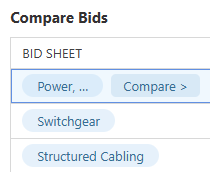
- Navigate to the "Compare Bids" tab.

🗒️ Note: This view provides a broader comparison of all Bid Sheets within the package, displaying each Bid Sheet alongside the overall bidding total submitted by each Bidder. - Click the desired Bid Sheet to open a detailed line-by-line comparison view.
- Bidder columns are arranged alphabetically within the comparison view, with Bidders who have set a "Will Not Bid" intention automatically excluded.
- Review and evaluate bidder pricing across line items to inform award decisions.
ADDITIONAL INFORMATION
- Subscription Level: Bid Tracking is available for ConstructionOnline accounts with active subscriptions at the Residential Business, Commercial Team and Business, Multi-Family Team and Business, and Enterprise levels.
- The Bid Tracking feature is also available as a Per-Company Add-On for all other plans.
- Permissions: Admin Users and Company Users with "Can Create, Edit, and Delete" permissions for Bid Tracking can add Bidders to a Bid Package.
- CO™ Mobile App: The Bid Tracking feature is currently available exclusively via browser access to ConstructionOnline.
HAVE MORE QUESTIONS?
- Frequently asked questions (FAQ) about Bid Tracking can be found in the article FAQ: Bid Tracking.
- If you need additional assistance, chat with a ConstructionOnline Specialist by clicking the orange Chat icon in the bottom left corner or visit the UDA Support Page for more options.