
BACKGROUND
Pay Rates aren't always set up before the first shift is logged—rates change, employees are added mid-project, or a company adopts Pay Rates after already tracking time for a while. Rather than leaving that earlier labor cost data incomplete, ConstructionOnline™ allows Pay Rates to be applied retroactively to shifts that were already logged, overriding any previously applied Pay Rates, so historical labor cost stays accurate without requiring shifts to be edited one by one.
THINGS TO CONSIDER
- Applying Pay Rates to past shifts overrides any Pay Rates previously applied to shifts within the selected date range.
- You can choose to apply Pay Rates to past shifts for all employees at once or for selected employees only.
- Selecting All Employees applies each employee's currently configured Pay Rate settings to their past shifts within the date range.
- Selecting Selected Employees allows specific employees to be chosen; each selected employee's configured Pay Rate settings are applied to their past shifts.
Applying Pay Rates to past shifts is available as an option when updating Pay Rates in ConstructionOnline.
If updated Pay Rates should only be applied to future shifts, leave the checkbox to Apply Pay Rates to past shifts unchecked.
HOW TO APPLY PAY RATES TO PAST SHIFTS
-
Navigate to the Time Summary within the Time Tracking feature.
- Click the gray 3-dot Action Menu at the top of the "Employees" table and select Time Tracking Settings from the dropdown menu.
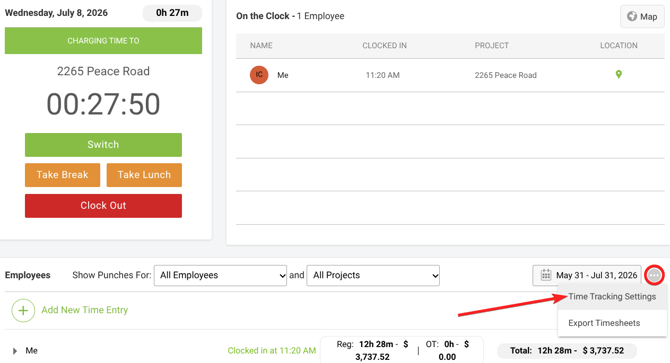
- This will open the Time Tracking Settings window.
- Select the Pay Rate Settings tab.

- This tab lists all Company Users and their current Pay Rate information: Default Pay Rate, OT Multiplier, OT Rate, and the number of configured Cost Code Pay Rates.
➡️ Tip: Before applying Pay Rates to past shifts, check the number of configured Cost Code Pay Rates for the desired employee(s). Visiting an individual employee's Set Pay Rates window will show exactly which Cost Codes have Pay Rates set that will apply, along with their current default Pay Rate.
- This tab lists all Company Users and their current Pay Rate information: Default Pay Rate, OT Multiplier, OT Rate, and the number of configured Cost Code Pay Rates.
- Update the desired Pay Rate settings, as needed.
- Check the box next to "Apply rates to past shifts" and enter the desired date range.
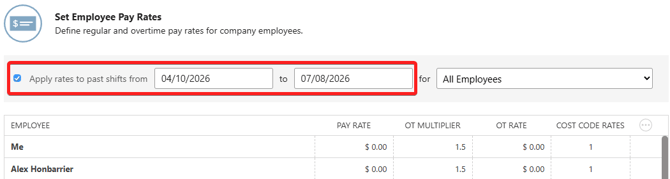
- By default, ConstructionOnline sets this range to the past 90 days. Adjust the start and/or end date as needed.
- Select whether to apply rates for All Employees or Selected Employees.
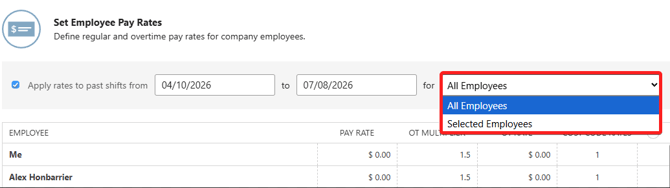
- All Employees applies each employee's currently configured Pay Rate settings to their past shifts within the date range.
- If Selected Employees is chosen, use the field that appears to search for and select the desired employee(s). Each selected employee's configured Pay Rate settings will be applied to their past shifts.
- Press the blue "Save" button to apply the Pay Rate settings to shifts logged within the selected date range, overriding any previously applied Pay Rates.
ADDITIONAL INFORMATION
- Alternative Access Point: You can also apply a specific employee's Pay Rate settings to past shifts by managing that individual employee's Pay Rates within their Set Pay Rates window.
- Subscription Level: The Pay Rates feature is available for any active ConstructionOnline subscription with access to Time Tracking, whether included at the Business and Enterprise levels or as a Per-Company Add-On.
- Permissions: Select the option stating "User can view/manage pay rates for other users" to enable access for Company Users who should be able to set Pay Rates for Employees.
HAVE MORE QUESTIONS?
- If you need additional assistance, chat with a ConstructionOnline Specialist by clicking the orange Chat icon in the bottom left corner or visit the UDA Support Page for more options.