
BACKGROUND
Many construction projects—particularly those involving public funding, institutional owners, or formal lending requirements—require billing documentation submitted on official AIA forms. Meeting those requirements manually can be time-consuming and prone to formatting errors. ConstructionOnline's Payment Application Print Overlay eliminates this friction by outputting pay app data directly onto official AIA forms, sized and formatted for a clean, professional result without requiring additional tools or manual effort.
THINGS TO CONSIDER
- Payment Applications can be accessed at both the Company and Project levels:
- Company-Level: Displays all Payment Applications across all Projects.
- Project-Level: Displays only Payment Applications associated with the selected Project.
- Ensure the official AIA form(s) are loaded in your printer before printing. The Print Overlay outputs pay app data sized and formatted to align directly onto the physical forms.
HOW TO PRINT A PAYMENT APPLICATION ONTO AN AIA FORM
- Navigate to the Payment Applications feature from within the desired Project.
- Right-click on the Payment Application you wish to print onto the forms and select "Print Overlay" from the dropdown menu.
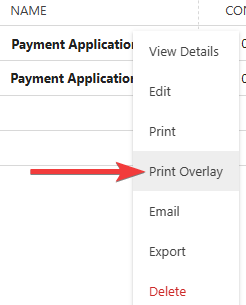
- This will open a new browser tab with the AIA-formatted Payment Application document.
- After reviewing the document for accuracy and completeness, click the "Print" button in the upper right corner to configure your printer settings and print your AIA-formatted Payment Application.

ADDITIONAL INFORMATION
- Subscription Level: ConstructionOnline's Payment Applications are available for companies using ConstructionOnline Commercial, Specialty, or Multi-family subscriptions at the Business or Enterprise level.
- The Payment Applications feature is also available as a Per-Company Add-On for all other plans.
- Permissions: Admin Users and Company Users with "Can View" or "Can Create, Edit, & Delete" permissions can print Payment Applications.
-
CO™ Mobile App: Currently, the Payment Applications feature is exclusively available through browser access to ConstructionOnline.
HAVE MORE QUESTIONS?
- Frequently asked questions (FAQ) about Payment Applications can be found in the article FAQ: Payment Applications.
- If you need additional assistance, chat with a ConstructionOnline Specialist by clicking the orange Chat icon in the bottom left corner or visit the UDA Support Page for more options.