
BACKGROUND
Configuring specific insurance & certificate reminders within ConstructionOnline's OnGuard™ Insurance Tracking feature helps streamline the management of insurance policies, licenses, bonds, and certificates by automating notifications for upcoming renewals and expirations. By alerting the necessary parties, reminders minimize the risk of compliance issues, ensure continuous coverage, and help maintain a strong relationship with partners by facilitating timely communication. Users can customize the email templates and the frequency at which they send, ensuring that the right people receive the information at the right time, ultimately enhancing operational efficiency and mitigating potential liabilities.
⚠️ Important: Certificate Tracking Settings are global - any changes made to insurance & certificate reminders within your Certificate Settings apply to all users and affect all projects within your Company Account.
HOW TO MANAGE INSURANCE & CERTIFICATE REMINDERS
- Navigate to the Insurance & Certificates feature.
- Click on the gray 3-dot Action Menu
 and select the "Certificate Settings" option from the dropdown menu.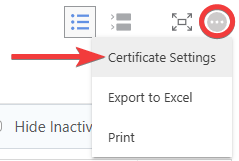
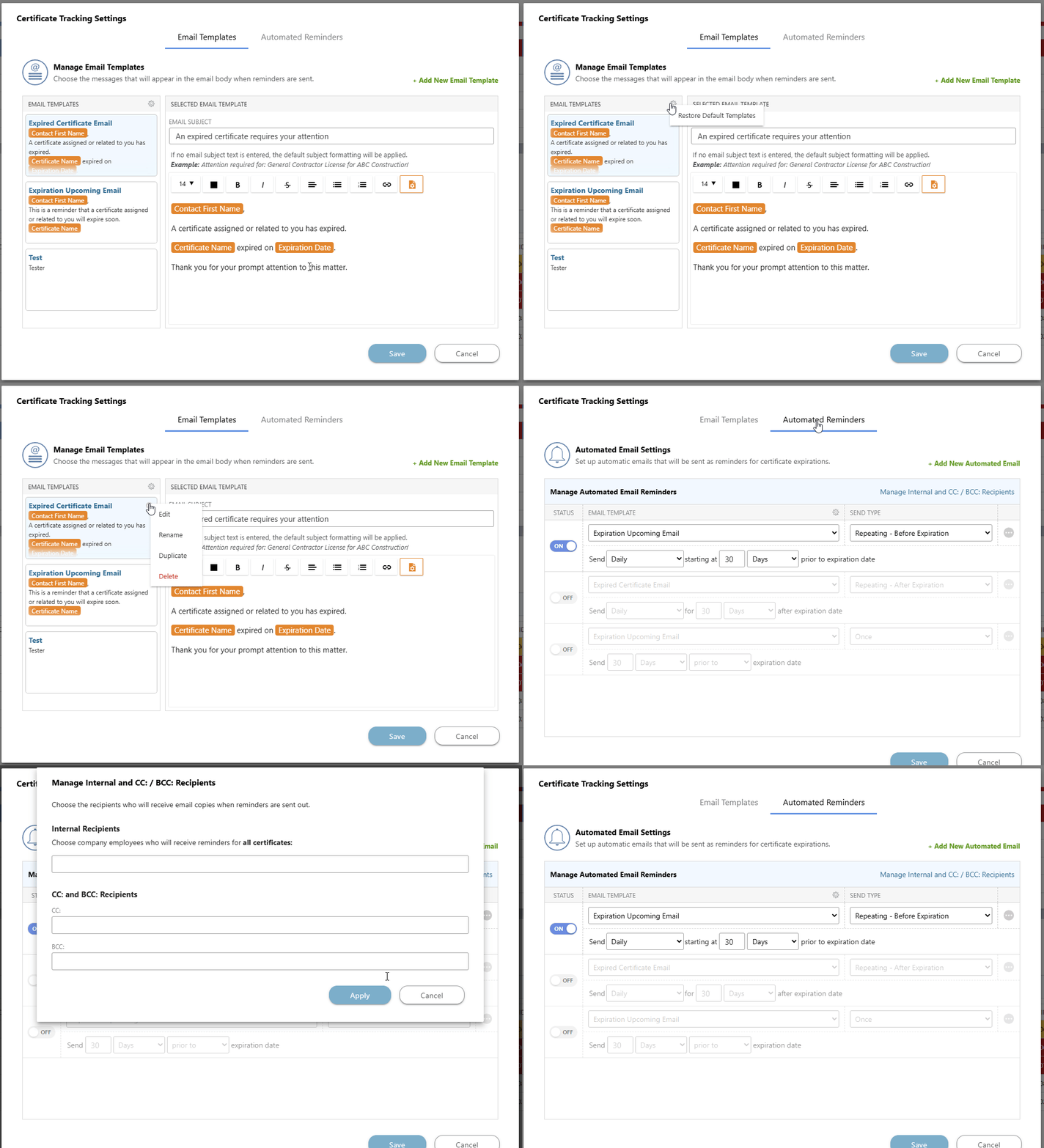
- The "Certificate Tracking Settings" window will open on your screen, where you can configure your insurance & certificate reminders' Email Templates and Automated Reminders -

- Email Templates: Customize the message that will appear in the email body when reminders are sent.
- ConstructionOnline provides two default email templates, preloaded into all accounts with access to OnGuard Insurance Tracking. These email templates are configured to auto-populate with key details from the related insurance policy, license, bond, or certificate.
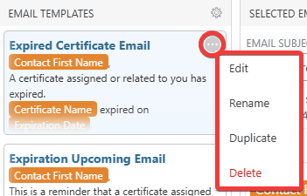
- Modify existing email templates by hovering over them, clicking on their gray 3-dot Action Menu, and choosing from the options: "Edit," "Rename," "Duplicate," or "Delete."
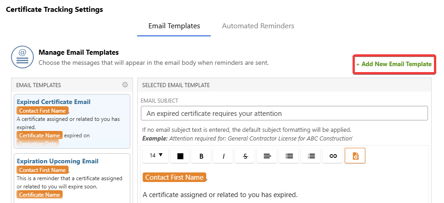
- Beyond the two default templates provided, new custom email templates can be created by clicking on the green (+) Add New Email Template button.
Note: The default templates can be restored at any time by clicking the gear icon at the top of your "Email Templates" List and selecting "Restore Default Templates."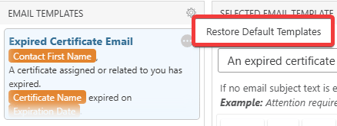
- Modify existing email templates by hovering over them, clicking on their gray 3-dot Action Menu, and choosing from the options: "Edit," "Rename," "Duplicate," or "Delete."
- ConstructionOnline provides two default email templates, preloaded into all accounts with access to OnGuard Insurance Tracking. These email templates are configured to auto-populate with key details from the related insurance policy, license, bond, or certificate.
- Automated Reminders: Manage the content and timing of automatic emails sent to chosen recipients for open and overdue insurance & certificates.
- Choose the "Status," "Email Template," "Send Type," and "Frequency" for the reminder being sent.
- A reminder's status must be toggled On to be activated and can be toggled Off at any time.
- When managing your automated email reminders, select the green (+) Add New Automated Email to add another reminder to your list. A single insurance policy, license, bond, or certificate can receive multiple of these scheduled reminders if it meets each of their defined criteria. You can also click on the 3 gray-dot Action Menu of the desired reminder to push through an email at that time or to delete it.
- Choose the "Status," "Email Template," "Send Type," and "Frequency" for the reminder being sent.
- Email Templates: Customize the message that will appear in the email body when reminders are sent.
- Click the blue "Save" button to save all changes made to your Company Account's Certificate Settings and apply the reminder configuration.
ADDITIONAL INFORMATION
- Subscription Level: ConstructionOnline's OnGuard Insurance Tracking feature offers different levels of coverage based on the subscription tier:
- Team subscriptions include tracking for insurance policies.
- Business and Enterprise subscriptions include tracking for insurance policies, licenses, bonds, and certificates.
- For all other ConstructionOnline plans, the full Insurance Tracking feature (including policies, licenses, bonds, and certificates) is available as a Per-Company Add-On.
- Permissions: Admin Users and Company Users with "Can Create, Edit, & Delete" permissions for Certificate Tracking can manage reminders for Insurance & Certificates.
- CO™ Mobile App: Currently, the OnGuard Insurance Tracking feature is exclusively available through browser access to ConstructionOnline.
HAVE MORE QUESTIONS?
- Frequently asked questions (FAQ) about Insurance & Certificates can be found in the article FAQ: Insurance & Certificates.
- If you need additional assistance, chat with a ConstructionOnline Specialist by clicking the orange Chat icon in the bottom left corner or visit the UDA Support Page for more options.