
BACKGROUND
Custom logs in ConstructionOnline are specialized daily logs that allow teams to capture project-specific information in a structured, consistent way—from daily progress updates to detailed inspections. Being able to edit, duplicate, or delete custom logs ensures your documentation stays accurate, up to date, and tailored to changing workflows.
⚠️ Important: To manage custom logs, your Company Account must first have at least one custom log saved.
To learn how to create a custom log, view "Create a Custom Daily Log."
HOW TO MANAGE CUSTOM LOGS
- Navigate to the Daily Logging feature
- Locate the gray 3-dot Action Menu in the upper-right corner and choose the "Manage Custom Logs" option from the dropdown menu.
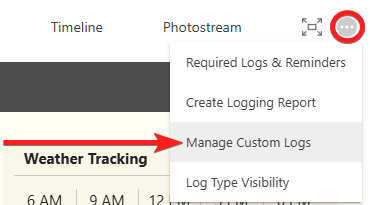
- This will open the "Custom Log Settings" window, displaying all custom logs in your Company Account.
- Hover over and select the gray 3-dot Action Menu for the desired custom log to reveal three options: Configure, Duplicate, and Delete.
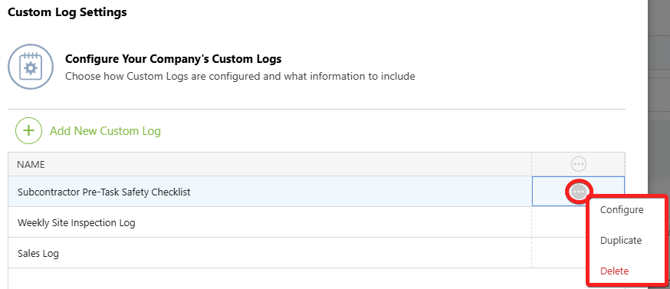
- Configure: Allows you to edit the log's details, including sections, subsections, and pre-filled information.
- Duplicate: Creates a copy of the selected log. The "Duplicate Custom Log" window will open, and the new log will appear as [Log Name] (1).
- Delete: Triggers a prompt for double-verification prompt. Clicking the red "Delete" button will permanently remove the log from your Company Account.
- Press the blue "Save" button to finalize any changes made while managing the custom log.
ADDITIONAL INFORMATION
- Subscription Level: ConstructionOnline's Advanced Daily Logging is available for companies with active subscriptions at the Business or Enterprise levels.
- Advanced Daily Logging is also available as a Per-Company Add-On for all other subscription plans.
- Permissions: Admin Users can manage custom logs.
- CO™ Mobile App: Custom logs must be managed via browser access to ConstructionOnline. Once configured, these custom logs can be used to create entries directly within the mobile app.
HAVE MORE QUESTIONS?
- Frequently asked questions (FAQ) regarding Daily Logs can be found in the FAQ: Daily Logs article.
- If you need additional assistance, chat with a ConstructionOnline Specialist by clicking the orange Chat icon in the bottom left corner or visit the UDA Support Page for more options.