
BACKGROUND
In construction, meticulously managing insurance policies and certificates is crucial for risk mitigation and compliance. The ability to export Insurance & Certificates to Excel from ConstructionOnline allows for seamless sharing of comprehensive information with external stakeholders who may not have direct access to the platform. Users can present this vital data in a universally familiar spreadsheet format, ensuring all parties requiring access can understand and utilize the information efficiently outside ConstructionOnline.
HOW TO EXPORT INSURANCE & CERTIFICATES TO EXCEL
- Navigate to the Insurance & Certificates feature.
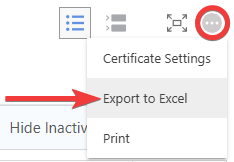
- Click on the gray 3-dot Action Menu
 and select the "Export to Excel" option from the dropdown menu.
- This will automatically download your insurance & certificates to your device as an Excel file ("Insurance & Certificates .xlsx.").
- Similarly to how they appear within ConstructionOnline, each will display as its own tab within Excel.
- This will automatically download your insurance & certificates to your device as an Excel file ("Insurance & Certificates .xlsx.").
🗒️ Note: When filters are applied to Insurance & Certificates, ConstructionOnline will prompt you to select between the options of "Export Filtered Results" and "Export All Certificates."
ADDITIONAL INFORMATION
- Subscription Level: ConstructionOnline's OnGuard™ Insurance Tracking feature offers different levels of coverage based on the subscription tier:
- Team subscriptions include tracking for insurance policies.
- Business and Enterprise subscriptions include tracking for insurance policies, licenses, bonds, and certificates.
- For all other ConstructionOnline plans, the full Insurance Tracking feature (including policies, licenses, bonds, and certificates) is available as a Per-Company Add-On.
- Permissions: Admin Users and Company Users with "Can View" or "Can Create, Edit, & Delete" permissions for Certificate Tracking can export Insurance & Certificates to Excel.
- CO™ Mobile App: Currently, the OnGuard Insurance Tracking feature is exclusively available through browser access to ConstructionOnline.
HAVE MORE QUESTIONS?
- Frequently asked questions (FAQ) about Insurance & Certificates can be found in the article FAQ: Insurance & Certificates.
- If you need additional assistance, chat with a ConstructionOnline Specialist by clicking the orange Chat icon in the bottom left corner or visit the UDA Support Page for more options.