
BACKGROUND
Bid Packages organize the scope of work being sent out for bid and track key information such as deadlines, site visits, bidder contacts, and aware timelines. As projects progress, teams often need to review or share this information outside of ConstructionOnline for reporting, coordination, or internal planning.
Exporting the "Bid Packages" List, either at the Company- or Project-Level, provides a simple way to work with this data in a familiar spreadsheet format. Whether reviewing bid timelines, sharing package details with team members, or maintaining offline records, exporting allows teams to quickly access and distribute their Bid Tracking information outside the system while preserving the structure of the list.
THINGS TO CONSIDER
- Bid Packages can be accessed at both the Company and Project/Opportunity levels:
- Company-Level: Displays all Bid Packages across all projects.
- Project/Opportunity-Level: Displays only Bid Packages associated with the selected Project or Opportunity.
HOW TO EXPORT BID PACKAGES TO EXCEL
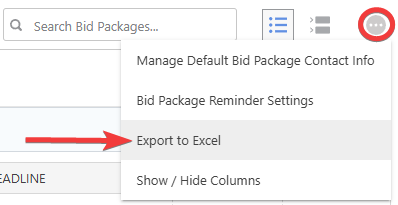
- From within your "Bid Packages" list, click on the gray 3-dot Action Menu
 .
. - Select the "Export to Excel" option from the dropdown menu to automatically download the "Bid Packages" List to your device as an Excel (.XLSX) file.
ADDITIONAL INFORMATION
- Subscription Level: Bid Tracking is available for ConstructionOnline accounts with active subscriptions at the Residential Business, Commercial Team and Business, Multi-Family Team and Business, and Enterprise levels.
- The Bid Tracking feature is also available as a Per-Company Add-On for all other plans.
- Permissions: Admin Users and Company Users with "Can View" or "Can Create, Edit, and Delete" permissions for Bid Tracking can export Bid Packages.
- CO™ Mobile App: The Bid Tracking feature is currently available exclusively via browser access to ConstructionOnline.
HAVE MORE QUESTIONS?
- Frequently asked questions (FAQ) about Bid Tracking can be found in the article FAQ: Bid Tracking.
- If you need additional assistance, chat with a ConstructionOnline Specialist by clicking the orange Chat icon in the bottom left corner or visit the UDA Support Page for more options.