
BACKGROUND
In the dynamic world of construction, the details of insurance policies, licenses, bonds, and certifications aren't static; they frequently require updates and modifications. Companies might need to adjust coverage amounts, renew expiration dates, add or remove covered resources, update contact information, or refine classification details as projects evolve, regulations change, or new personnel join the team. Staying on top of these changes is crucial for maintaining compliance, managing risk, and ensuring continuous operational legality. Neglecting to update these essential documents can lead to costly penalties, project delays, or even legal repercussions.
ConstructionOnline offers significant advantages by enabling users to edit and update these critical credentials directly within the platform. By providing a centralized hub for making necessary adjustments promptly, it eliminates the inefficiencies and risks associated with manual tracking or fragmented systems.
⚠️ Important: Archived credentials cannot be edited. Should a user attempt to modify an archived credential, ConstructionOnline will prompt them to unarchive it first.
HOW TO EDIT INSURANCE & CERTIFICATES
- Access the "Team Management" tab through the Left Sidebar or the Company Selector in the Top Navigation Bar.
- Select the desired option (Insurance, Licenses, Bonds, or Certifications) under the "Insurance & Certificates" section.
- Locate the desired credential you wish to edit.
- Hover over the credential and either press the blue "Details>" button or right-click and select "Edit."
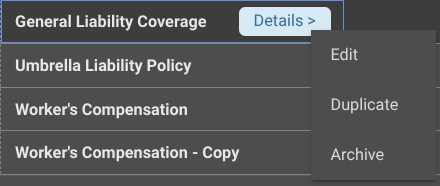
- The credential's extension blade will open on the right side of your screen, where you can make the desired changes within each tab -

- Details: Information about the credential
- Attachments: Any files and/or photos associated with the credential
- Notes: Any relevant notes, including optional Time Stamps
- Reminder Recipients: Reminders set for the credential
- Internal Recipients: Company Users in your ConstructionOnline account.
- For all
- For the specific one being edited
- External Recipients: Any Contacts within your ConstructionOnline account.
- For the specific one being edited
- Internal Recipients: Company Users in your ConstructionOnline account.
- Click the blue "Save" button to finalize the changes made to the insurance policy, license, bond, or certification.
ADDITIONAL INFORMATION
- Alternative Access Point: You may also edit a credential by clicking the desired category column within its row on the dynamic table.
- Subscription Level: ConstructionOnline's OnGuard™ Insurance Tracking feature offers different levels of coverage based on the subscription tier:
- Team subscriptions include tracking for insurance policies.
- Business and Enterprise subscriptions include tracking for insurance policies, licenses, bonds, and certificates.
-
- For all other ConstructionOnline plans, the full Insurance Tracking feature (including policies, licenses, bonds, and certificates) is available as a Per-Company Add-On.
- Permissions: Admin Users and Company Users with "Can Create, Edit, & Delete" permissions for Certificate Tracking can edit Insurance & Certificates.
- CO™ Mobile App: Currently, the OnGuard Insurance Tracking feature is exclusively available through browser access to ConstructionOnline.
HAVE MORE QUESTIONS?
- If you need additional assistance, chat with a ConstructionOnline Specialist by clicking the orange Chat icon in the bottom left corner or visit the UDA Support Page for more options.