
BACKGROUND
Effective communication is critical for managing complex construction jobs, where details change quickly and clarity matters. As teams collaborate across multiple project phases, the ability to edit existing comments helps prevent misunderstandings, reduce rework, and maintain accurate project documentation.
ConstructionOnline's Comments feature allows teams, clients, and subcontractors to collaborate directly within the tools they already use. When project details evolve or additional context is needed, authorized users can easily edit Comments to keep information accurate, discussions relevant, and communication professional throughout every stage of the project.
THINGS TO CONSIDER
- Comments are available across multiple ConstructionOnline features. For a complete list of supported features, see FAQ: Comments in ConstructionOnline.
- Access to Comments depends on your current ConstructionOnline subscription and the inclusion of each specific feature.
- Users can only access or interact with Comments if they have the appropriate feature-level permissions and visibility to the specific Comment Thread.
- Comments can only be modified by their original creator.
HOW TO EDIT A COMMENT
- Navigate to the desired Project and open the associated feature (e.g. Daily Logging, Client Selections).
- Hover over the record containing the desired Comment Thread (such as a log entry or selection choice).
- Locate and click the Comment icon to open the "Comments Thread" window.

- Right-click on the Comment you would like to edit and select the "Edit" option from the dropdown menu.
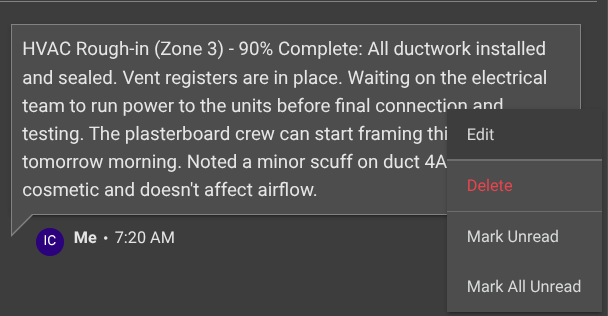
- This will open the "Comment Details" window.
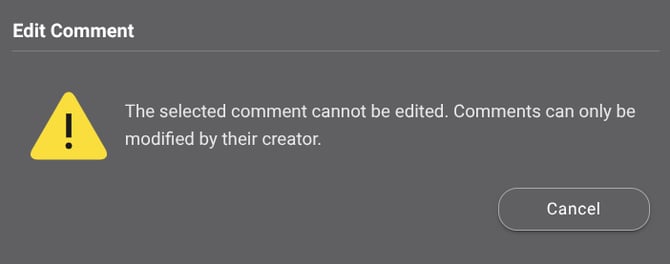
- If you attempt to edit a Comment that does not belong to you, ConstructionOnline will display a message indicating that the selected Comment cannot be edited.
- Make the desired updates to the Comment text, visibility settings, and attachments as needed.
- Press the blue "Post" button to finalize the changes and update the Comment in the thread.
ADDITIONAL INFORMATION
- Subscription Level: ConstructionOnline's Comments are available to ConstructionOnline Company Accounts with an active subscription that includes access to supported features.
- Permissions: ConstructionOnline Users can edit their own Comments, but cannot edit Comments created by others.
- CO™ Mobile App: Comments are available within all mobile app features that support Comments.
HAVE MORE QUESTIONS?
- Frequently asked questions (FAQ) about Comments can be found in the article FAQ: Comments.
- If you need additional assistance, chat with a ConstructionOnline Specialist by clicking the orange Chat icon in the bottom left corner or visit the UDA Support Page for more options.