
BACKGROUND
Construction permit management is a critical yet often cumbersome aspect of construction projects. The sheer volume of permits required for project completion can lead to significant administrative overhead, delays, and potential compliance issues. The efficient handling of permits is not just a convenience but a necessity for maintaining project schedules, minimizing costs, and ensuring regulatory adherence.
ConstructionOnline's options for editing and/or archiving multiple permits in a singular action help to streamline permit management, drastically reducing the time spent on individual permit modifications and leading to higher productivity and fewer errors.
HOW TO BULK EDIT/ARCHIVE PERMITS
- Navigate to the Permit Tracking feature.
- Check the boxes next to the permits within the "Project Permits" List that you would like to edit/archive.
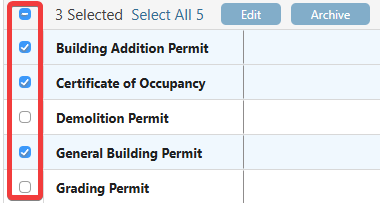
- If you wish to edit/archive all of your permits, check the top box in the column header to "Select All."
- Once the desired permits are selected, click one of the two blue buttons that appear -
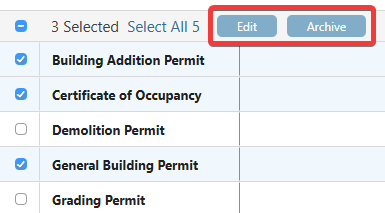
- Edit: Select which permit field to modify for each of the selected permits from the dropdown menu.
- Project: Associate the permits with a Project.
- Permit Type: Assign the permits a type.
- Permit Status: Indicate the status of the permits.
- Agency Contact: Link a Contact as the agency issuing the permits.
- Responsible Contact: Choose a Contact responsible for the permits.
- Active: Change all of the permits to "Active" or "Inactive."
- Archive: Archive the selected permits.
- Once the permits have been archived, the blue button will show as "Unarchive," an action that can also be applied to multiple archived permits at once.
- Edit: Select which permit field to modify for each of the selected permits from the dropdown menu.
ADDITIONAL INFORMATION
- Subscription Level: ConstructionOnline's OnGuard Permit Tracking feature is available for companies with current ConstructionOnline subscriptions at Team, Business, and Enterprise levels.
- Permit Tracking is also available as a Per-Company Add-On for all other plans.
- Permissions: Admin Users and Company Users with "Can Create, Edit, & Delete" permissions for Permits can bulk edit/archive permits.
- CO™ Mobile App: Users with the appropriate permissions can edit and archive permits via the mobile app. However, bulk edit/archive options are exclusively available through browser access to ConstructionOnline.
HAVE MORE QUESTIONS?
- Frequently asked questions (FAQ) about Permit Tracking can be found in the article FAQ: Permit Tracking.
- If you need additional assistance, chat with a ConstructionOnline Specialist by clicking the orange Chat icon in the bottom left corner or visit the UDA Support Page for more options.