
BACKGROUND
In construction, managing a vast array of insurance policies, licenses, bonds, and certifications is a continuous effort. Often, a company might need to generate new credentials that are very similar to existing ones. This could happen when a policy needs a minor adjustment for a new project or a bond is required for a different phase of the same project. Creating these new documents from scratch can be time-consuming and introduce opportunities for error, especially when many fields remain the same.
ConstructionOnline enables users to duplicate existing credentials to quickly create a copy, pre-filled with most of the necessary information. This feature significantly streamlines the process of generating new, similar documents, saving valuable time and reducing the risk of manual data entry mistakes.
⚠️ Important: Archived credentials cannot be duplicated.
HOW TO DUPLICATE INSURANCE & CERTIFICATES
- Access the "Team Management" tab through the Left Sidebar or the Company Selector in the Top Navigation Bar.
- Select the desired option (Insurance, Licenses, Bonds, or Certifications) under the "Insurance & Certificates" section.
- Locate the desired credential you wish to duplicate.
- Right-click on the credential and select the "Duplicate" option.
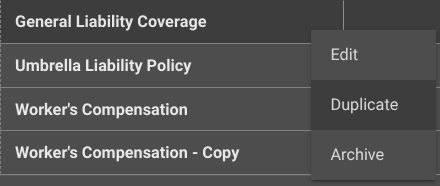
- This will create a copy that will appear within the list view.

- This will create a copy that will appear within the list view.
➡️ Pro Tip: Duplicate multiple at a time by selecting their checkboxes, right-clicking any of the selected credentials, and choosing the "Duplicate" option.
ADDITIONAL INFORMATION
- Subscription Level: ConstructionOnline's OnGuard™ Insurance Tracking feature offers different levels of coverage based on the subscription tier:
- Team subscriptions include tracking for insurance policies.
- Business and Enterprise subscriptions include tracking for insurance policies, licenses, bonds, and certificates.
- For all other ConstructionOnline plans, the full Insurance Tracking feature (including policies, licenses, bonds, and certificates) is available as a Per-Company Add-On.
- Permissions: Admin Users and Company Users with "Can Create, Edit, & Delete" permissions for Certificate Tracking can duplicate Insurance & Certificates.
- CO™ Mobile App: Currently, the OnGuard Insurance Tracking feature is exclusively available through browser access to ConstructionOnline.
HAVE MORE QUESTIONS?
- If you need additional assistance, chat with a ConstructionOnline Specialist by clicking the orange Chat icon in the bottom left corner or visit the UDA Support Page for more options.