
BACKGROUND
Duplicating a Bid Package Template in ConstructionOnline allows users to reuse an existing template as a starting point for a new one, helping reduce repetitive setup and maintain consistency across Bid Packages. This is especially useful when creating templates for similar scopes, trades, or project types. When a template is duplicated, its structure, details, files, and Bid Sheets are carried over when compatible, allowing teams to make targeted adjustments without rebuilding the package from scratch.
HOW TO DUPLICATE A BID PACKAGE TEMPLATE
- From within your "Bid Packages" list, navigate to the "Templates" tab.

- Locate the desired Bid Package Template you wish to duplicate.
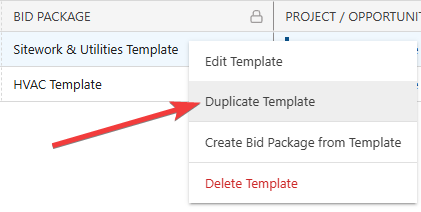
- Right-click on the template and select the "Duplicate Template" option from the dropdown menu.
- The "Copy of [Bid Package Template Name]" extension blade will open on the right side of your screen, where you can confirm or update Bid Package Template details for the new template.
🗒️ Note: If the Related Project/Opportunity is changed, any Bid Sheets created from the linked Estimate or Change Orders will still be created, but will be unlinked from their related Estimates and/or Change Orders. If this occurs, a message will flash in the bottom right corner of your screen.
- Click the blue "Save" button to finalize the new Bid Package Template.
- This will create a duplicate with the updated details within your "Bid Package Templates" List.
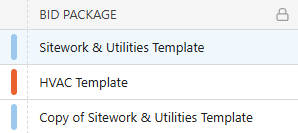
- This will create a duplicate with the updated details within your "Bid Package Templates" List.
ADDITIONAL INFORMATION
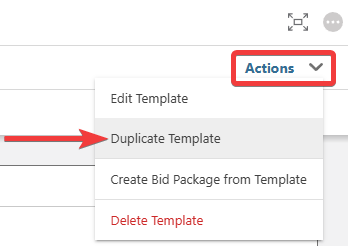
- Alternative Access Point: You can also duplicate Bid Package Templates by clicking on the desired package and selecting "Duplicate Template" from the blue "Actions" dropdown menu.
- Subscription Level: Bid Tracking is available for ConstructionOnline accounts with active subscriptions at the Residential Business, Commercial Team and Business, Multi-Family Team and Business, and Enterprise levels.
- The Bid Tracking feature is also available as a Per-Company Add-On for all other plans.
- Permissions: Admin Users and Company Users with "Can Create, Edit, and Delete" permissions for Bid Tracking can duplicate Bid Package Templates.
- CO™ Mobile App: The Bid Tracking feature is currently available exclusively via browser access to ConstructionOnline.
HAVE MORE QUESTIONS?
- Frequently asked questions (FAQ) about Bid Tracking can be found in the article FAQ: Bid Tracking.
- If you need additional assistance, chat with a ConstructionOnline Specialist by clicking the orange Chat icon in the bottom left corner or visit the UDA Support Page for more options.