
BACKGROUND
Many construction projects involve similar scopes of work, recurring documents, and standardized bid processes. Manually recreating these elements for each new Bid Package can be time-consuming and increase the risk of errors.
ConstructionOnline allows teams to duplicate existing Bid Packages, preserving key details such as scope of work, instructions, company information, and associated files. Duplication saves time and maintains consistency without creating a reusable template. Teams can then customize project-specific elements as needed while quickly generating a new, fully configured Bid Package.
HOW TO DUPLICATE A BID PACKAGE
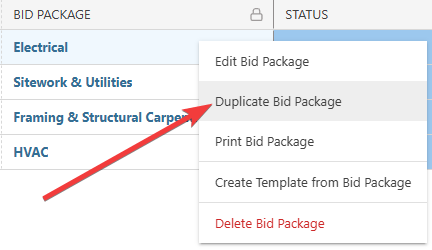
- From within your "Bid Packages" list, right-click on the desired Bid Package you wish to duplicate and select the "Duplicate Bid Package" option from the dropdown menu.
- The "Copy of [Bid Package Name]" extension blade will open on the right side of your screen, where you can confirm or update Bid Package details for the new package.
🗒️ Note: Bid submissions are not included when duplicating a Bid Package. Additionally, if the Related Project/Opportunity is changed, any Bid Sheets created from the linked Estimate or Change Orders will not be copied. If this occurs, a message will flash in the bottom right corner of your screen.
- Click the blue "Save" button to finalize the new Bid Package.
- This will create a duplicate with the updated details within your "Bid Packages" List.
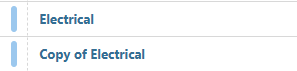
- This will create a duplicate with the updated details within your "Bid Packages" List.
ADDITIONAL INFORMATION
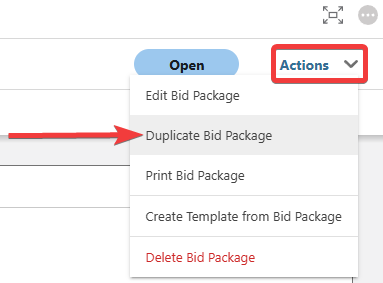
- Alternative Access Point: You can also duplicate Bid Packages by clicking on the desired package and selecting "Duplicate Bid Package" from the blue "Actions" dropdown menu.
- Subscription Level: Bid Tracking is available for ConstructionOnline accounts with active subscriptions at the Residential Business, Commercial Team and Business, Multi-Family Team and Business, and Enterprise levels.
- The Bid Tracking feature is also available as a Per-Company Add-On for all other plans.
- Permissions: Admin Users and Company Users with "Can Create, Edit, and Delete" permissions for Bid Tracking can duplicate Bid Packages.
- CO™ Mobile App: The Bid Tracking feature is currently available exclusively via browser access to ConstructionOnline.
HAVE MORE QUESTIONS?
- Frequently asked questions (FAQ) about Bid Tracking can be found in the article FAQ: Bid Tracking.
- If you need additional assistance, chat with a ConstructionOnline Specialist by clicking the orange Chat icon in the bottom left corner or visit the UDA Support Page for more options.