
BACKGROUND
While maintaining comprehensive records of insurance policies, licenses, bonds, and certifications is paramount in construction, there are instances where certain credentials genuinely have no further relevance or potential future value. This might occur if a document was created in error, was a duplicate entry, or pertains to a project or entity that is definitively and permanently disassociated from the company's operations. In such cases, retaining superfluous or incorrect entries can clutter records, create confusion, and potentially hinder efficient data management.
For these specific scenarios, ConstructionOnline's option to delete becomes a necessary tool. This feature allows companies to precisely remove irrelevant data, ensuring the integrity and clarity of their active and archived records.
THINGS TO CONSIDER
⚠️ Important: Deleted credentials cannot be recovered!
- Only Admin Users and Company Users with "Can Create, Edit, & Delete" permissions for Certificate Tracking can delete existing Insurance & Certificates.
- ConstructionOnline attempts to keep users from accidentally deleting documentation from their Company Accounts by requiring them to archive the credential before deletion and making users explicitly verify the deletion of any credential before completing the action.
- Users can only delete a credential without archiving it first from within that credential's extension blade.
BEST PRACTICE RECOMMENDATION
Unless a credential has absolutely no potential future value, we strongly recommend archiving rather than deleting it. This approach ensures data preservation, minimizes the risk of losing valuable information, and maintains a comprehensive and auditable project record within ConstructionOnline.
HOW TO DELETE INSURANCE & CERTIFICATES
- Access the "Team Management" tab through the Left Sidebar or the Company Selector in the Top Navigation Bar.
- Select the desired option (Insurance, Licenses, Bonds, or Certifications) under the "Insurance & Certificates" section.
- Locate the desired credential you wish to delete.
- Right-click on the credential and select the "Archive" option.
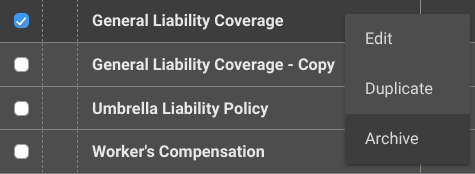
- Once the credential is grayed out, signifying it has been successfully archived, right-click on it again.
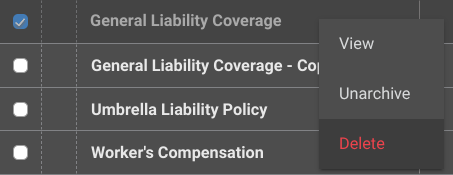
- Select the red "Delete" option from the dropdown menu.
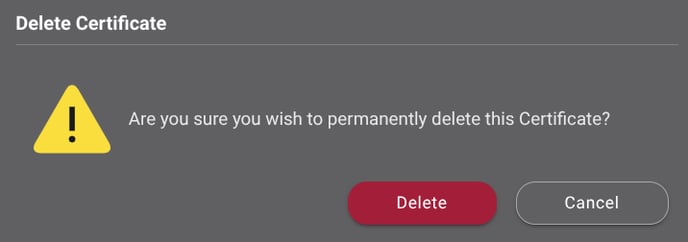
- ConstructionOnline will require double-verification to complete the deletion. Confirm your decision to delete the credential by clicking the red "Delete" button.
- ConstructionOnline will flash a message at the bottom right side of your screen confirming successful deletion. The blue "Undo" text is the only opportunity to revert the action.

ALTERNATIVE ACCESS POINT
- Access the "Team Management" tab through the Left Sidebar or the Company Selector in the Top Navigation Bar.
- Select the desired option (Insurance, Licenses, Bonds, or Certifications) under the "Insurance & Certificates" section.
- Locate the desired credential you wish to delete.
- Hover over the credential and either press the blue "Details >" button or right-click and select "Edit."
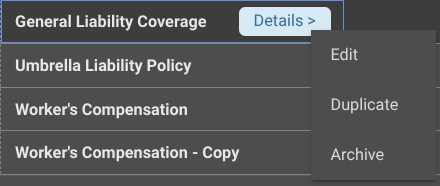
- This will open the credential's extension blade on the right side of your screen.
- Select the red "Delete" button.
- ConstructionOnline will have you verify your decision as outlined in Step 7 of the section above.
ADDITIONAL INFORMATION
- Deleting a credential only removes that specific version; it does not impact any other copies, including the original, and vice versa.
- Subscription Level: ConstructionOnline's OnGuard™ Insurance Tracking feature offers different levels of coverage based on the subscription tier:
- Team subscriptions include tracking for insurance policies.
- Business and Enterprise subscriptions include tracking for insurance policies, licenses, bonds, and certificates.
-
- For all other ConstructionOnline plans, the full Insurance Tracking feature (including policies, licenses, bonds, and certificates) is available as a Per-Company Add-On.
- Permissions: Admin Users and Company Users with "Can Create, Edit, & Delete" permissions for Certificate Tracking can delete Insurance & Certificates.
- CO™ Mobile App: Currently, the OnGuard Insurance Tracking feature is exclusively available through browser access to ConstructionOnline.
HAVE MORE QUESTIONS?
- If you need additional assistance, chat with a ConstructionOnline Specialist by clicking the orange Chat icon in the bottom left corner or visit the UDA Support Page for more options.