
BACKGROUND
In construction, consistency and clear communication are key to successful project management. Meeting templates help teams achieve this by standardizing agendas and attendee lists across projects.
But as workflows evolve, outdated or duplicate templates can clutter the system and create confusion. ConstructionOnline makes it easy for authorized users to delete meeting templates no longer in use, keeping Company Accounts clean, current, and efficient.
THINGS TO CONSIDER
⚠️ Important: Deleting a meeting template is a permanent action. Once deleted, meeting templates are permanently removed from the Company Account and cannot be recovered.
- Only Admin Users and Company Users with "Can Create, Edit, & Delete" permissions for Meeting Minutes can delete meeting templates.
HOW TO DELETE A MEETING TEMPLATE
- Access the Template
- Navigate to the "Meeting Templates" tab within the Meeting Minutes feature.
- Delete the Template
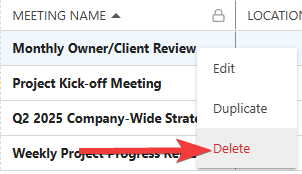
- Hover over the desired template and right-click to select the red "Delete" option from the dropdown menu.
- ConstructionOnline will flash a message at the bottom right side of your screen confirming successful deletion. The blue "Undo" text is the only opportunity to revert the action.

- Hover over the desired template and right-click to select the red "Delete" option from the dropdown menu.
ADDITIONAL INFORMATION
- Subscription Level: Meeting Minutes is available for companies with current ConstructionOnline Commercial or Multi-Family subscriptions at Team, Business, and Enterprise levels.
- Meeting Minutes is also available as a Per-Company Add-On for all other plans.
- Permissions: Admin Users and Company Users with "Can Create, Edit, and Delete" for Meeting Minutes can delete meeting templates.
- CO™ Mobile App: The Meeting Minutes feature is available via the mobile app. However, Meeting Templates can only be accessed and managed through browser access to ConstructionOnline.
HAVE MORE QUESTIONS?
- Frequently asked questions (FAQ) about Meeting Minutes can be found in the article FAQ: Meeting Minutes.
- If you need additional assistance, chat with a ConstructionOnline Specialist by clicking the orange Chat icon in the bottom left corner or visit the UDA Support Page for more options.