
BACKGROUND
Maintaining accurate and relevant company records is essential for effective project management. When a business relationship concludes, you can securely remove that company's information from your ConstructionOnline Company Account. Doing so ensures your data remains organized and reflects your current business network.
⚠️ Deleted Companies cannot be recovered!
However - note that deleting a Company within the system does not delete the Contact(s) associated with that Company. These Contacts will still appear in your Company Contacts List.
- Additionally, the "Company" field for the associated contacts will not be automatically cleared upon Company deletion.
HOW TO DELETE A COMPANY
- From the "Companies" portion of your Company Directory, hover over the desired Company and click the blue "Details >" button.
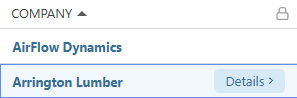
- This will open the Company's extension blade on the right side of your screen.

- This will open the Company's extension blade on the right side of your screen.
- Hit the red "Delete" button to remove the Company from the "Companies" List and your ConstructionOnline Company Account.
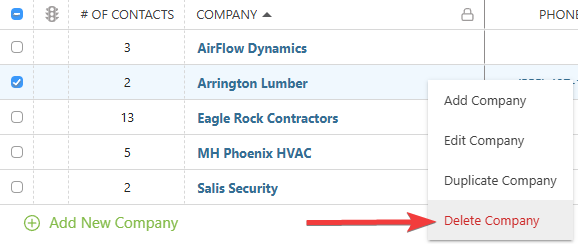
- ConstructionOnline will flash a message confirming the successful deletion. If you deleted the Company by mistake, pressing the blue "Undo" text is the only opportunity to revert the action.

- ConstructionOnline will flash a message confirming the successful deletion. If you deleted the Company by mistake, pressing the blue "Undo" text is the only opportunity to revert the action.
BULK DELETE COMPANIES
Companies can be deleted in bulk within the "Companies" List -
- Check the boxes next to the Companies within the list that you would like to delete.
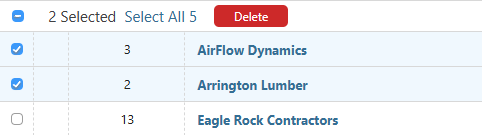
- If you wish to delete all of your Companies, check the top box in the column header to "Select All."
- Once the desired Companies are selected, click the red "Delete" button.
- If you've selected any Companies that are assigned somewhere within Insurance & Certificates, you will be prompted to unassign from all credentials before proceeding.
ADDITIONAL INFORMATION
- Subscription Level: The Company Directory is available for all ConstructionOnline subscriptions.
- Permissions: Admin Users and Company Users can delete a Company from their Company Account's Companies List.
- CO™ Mobile App: The Companies feature is available via the mobile app. However, Company deletion is exclusively available through browser access to ConstructionOnline.
HAVE MORE QUESTIONS?
- Frequently asked questions (FAQ) about Companies can be found in the article FAQ: Companies.
- If you need additional assistance, chat with a ConstructionOnline Specialist by clicking the orange Chat icon in the bottom left corner or visit the UDA Support Page for more options.