
BACKGROUND
Bid Package Templates help standardize how Bid Packages are created across Projects/Opportunities in ConstructionOnline. Over time, templates may become outdated, duplicated, or no longer relevant to your current estimating and bidding workflows. Deleting a Bid Package Template allows users to keep the "Bid Package Templates" List organized and ensure the team is working from accurate, approved standards.
⚠️ Important: Deleting a Bid Package Template is a permanent action. Once deleted, Bid Package Templates are permanently removed from the Company Account and cannot be recovered.
HOW TO DELETE A BID PACKAGE TEMPLATE
- From within your "Bid Packages" list, navigate to the "Templates" tab.

- Locate the desired Bid Package Template you wish to delete.
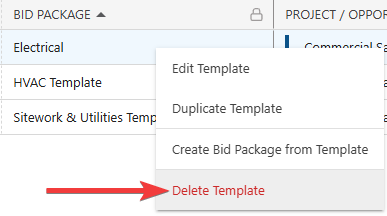
- Right-click on the template and select the red "Delete Template" option from the dropdown menu.
- A confirmation message will appear in the bottom-right corner of your screen confirming deletion. The blue "Undo" text is the only opportunity to revert the action.

- A confirmation message will appear in the bottom-right corner of your screen confirming deletion. The blue "Undo" text is the only opportunity to revert the action.
ADDITIONAL INFORMATION
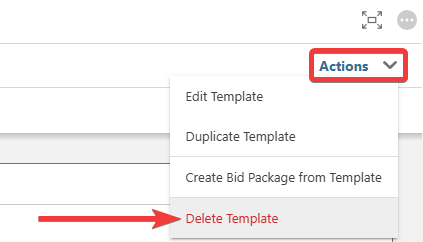
- Alternative Access Point: You can also delete Bid Package Templates by clicking on the desired template and selecting the "Delete Template" option from the blue "Actions" dropdown menu.
- Subscription Level: Bid Tracking is available for ConstructionOnline accounts with active subscriptions at the Residential Business, Commercial Team and Business, Multi-Family Team and Business, and Enterprise levels.
- The Bid Tracking feature is also available as a Per-Company Add-On for all other plans.
- Permissions: Admin Users and Company Users with "Can Create, Edit, and Delete" permissions for Bid Tracking can delete Bid Package Templates.
- CO™ Mobile App: The Bid Tracking feature is currently available exclusively via browser access to ConstructionOnline.
HAVE MORE QUESTIONS?
- Frequently asked questions (FAQ) about Bid Tracking can be found in the article FAQ: Bid Tracking.
- If you need additional assistance, chat with a ConstructionOnline Specialist by clicking the orange Chat icon in the bottom left corner or visit the UDA Support Page for more options.