
BACKGROUND
During the bidding process, there may be times when a Bid Package needs to be removed—such as duplicate packages, canceled scopes of work, or test entries that are no longer needed. Keeping your Bid Packages List organized helps reduce confusion, maintain focus on active bids, and ensure your bidding records remain accurate and up to date.
⚠️ Important: Deleting a Bid Package is a permanent action. Once deleted, Bid Packages are permanently removed from the Company Account and cannot be recovered.
HOW TO DELETE A BID PACKAGE
- From within your "Bid Packages" List, locate the desired Bid Package you wish to delete.
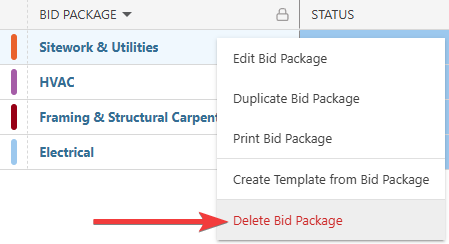
- Right-click on the package and select the red "Delete Bid Package" option from the dropdown menu.
- A confirmation message will appear in the bottom-right corner of your screen confirming deletion. The blue "Undo" text is the only opportunity to revert the action.

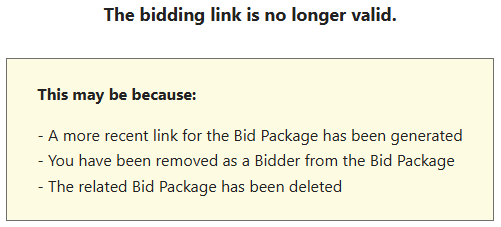
- If any bid invitations were sent prior to deletion, those bid invitation emails will automatically update to display the following message when Bidders attempt to view the deleted Bid Package:
- A confirmation message will appear in the bottom-right corner of your screen confirming deletion. The blue "Undo" text is the only opportunity to revert the action.
ADDITIONAL INFORMATION
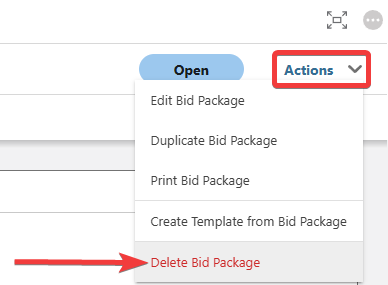
- Alternative Access Point: You can also delete Bid Packages by clicking on the desired package and selecting the "Delete Bid Package" option from the blue "Actions" dropdown menu.
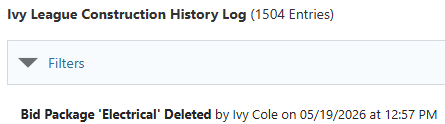
- You can see information regarding this activity logged in the Company History Log, where ConstructionOnline records the Bid Package that was deleted, the user who deleted the package, and the date and time of deletion.
- Subscription Level: Bid Tracking is available for ConstructionOnline accounts with active subscriptions at the Residential Business, Commercial Team and Business, Multi-Family Team and Business, and Enterprise levels.
- The Bid Tracking feature is also available as a Per-Company Add-On for all other plans.
- Permissions: Admin Users and Company Users with "Can Create, Edit, and Delete" permissions for Bid Tracking can delete Bid Packages.
- CO™ Mobile App: The Bid Tracking feature is currently available exclusively via browser access to ConstructionOnline.
HAVE MORE QUESTIONS?
- Frequently asked questions (FAQ) about Bid Tracking can be found in the article FAQ: Bid Tracking.
- If you need additional assistance, chat with a ConstructionOnline Specialist by clicking the orange Chat icon in the bottom left corner or visit the UDA Support Page for more options.