
BACKGROUND
Managing crucial documents like insurance policies, licenses, bonds, and certifications in construction is a constant administrative challenge. These credentials are vital for compliance, bidding, and smoother operations, but keeping them updated for numerous subcontractors, vendors, or team members can be a huge burden. Companies frequently need to adjust multiple records simultaneously due to updated classifications, reassignment to new projects, or widespread status changes like expirations. Manually updating each one is time-consuming and prone to errors.
Similarly, as projects end or relationships evolve, archiving many unneeded credentials at once becomes essential for maintaining organized, clutter-free records. The ability to bulk edit or archive these vital documents in ConstructionOnline significantly streamlines these processes, saving valuable time, reducing errors, and ensuring your records are always accurate and compliant.
HOW TO BULK EDIT/ARCHIVE INSURANCE & CERTIFICATES
- Access the "Team Management" tab through the Left Sidebar or the Company Selector in the Top Navigation Bar.
- Select the desired option (Insurance, Licenses, Bonds, or Certifications) under the "Insurance & Certificates" section.
- Check the boxes next to the desired credentials that you would like to edit/archive.
- If you wish to edit/archive all, check the top box in the column header to "Select All."
- Once the desired credentials are selected, click one of the two blue buttons that appear -
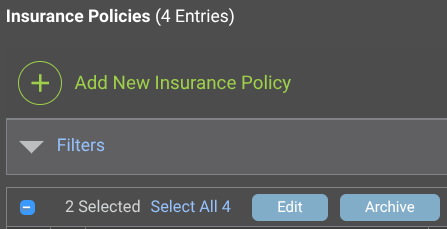
- Edit: Select which field to modify for each of the selected credentials from the dropdown menu.
- Company: Associate the credentials with a Company.
- Project: Assign a specific Project, Template, or Opportunity to the credentials.
- Type: Indicate the type.
- Classification: Specify the way the credentials are classified based on its specific purpose.
- Status: Choose the current state of the credentials.
- Active: Change all of the credentials to "Active" or "Inactive."
- Archive: Archive the selected credentials.
- Once the credentials have been archived, the blue button will show as "Unarchive," an action that can also be applied to multiple archived credentials at once.
- Edit: Select which field to modify for each of the selected credentials from the dropdown menu.
ADDITIONAL INFORMATION
- Subscription Level: ConstructionOnline's OnGuard™ Insurance Tracking feature offers different levels of coverage based on the subscription tier:
- Team subscriptions include tracking for insurance policies.
- Business and Enterprise subscriptions include tracking for insurance policies, licenses, bonds, and certificates.
- For all other ConstructionOnline plans, the full Insurance Tracking feature (including policies, licenses, bonds, and certificates) is available as a Per-Company Add-On.
- Permissions: Admin Users and Company Users with "Can Create, Edit, & Delete" permissions for Certificate Tracking can bulk edit/archive insurance policies.
- CO™ Mobile App: Currently, the OnGuard Insurance Tracking feature is exclusively available through browser access to ConstructionOnline.
HAVE MORE QUESTIONS?
- If you need additional assistance, chat with a ConstructionOnline Specialist by clicking the orange Chat icon in the bottom left corner or visit the UDA Support Page for more options.