
BACKGROUND
Employees in similar roles often share the same pay structure—the same default Pay Rate, and often the same Cost Code Pay Rates for specialized work. Rather than re-entering that same setup for every employee individually, ConstructionOnline™ allows one employee's full Pay Rate configuration to be copied directly to other Company Users, keeping pay consistent across similar roles without repetitive setup.
THINGS TO CONSIDER
- The source employee (whose rates are being copied) must have at least one Cost Code Pay Rate set. The Apply Pay Rates to Other Users option is not available for an employee who only has a default Pay Rate configured.
Applying Pay Rates to other users completely replaces the selected employees' current Pay Rate settings—including their default Pay Rate and all Cost Code Pay Rates—with the source employee's Pay Rate settings. This includes removing any Cost Code Pay Rates that the selected employee(s) already have that the source employee does not.
HOW TO APPLY AN EMPLOYEE'S PAY RATES TO OTHER USERS
- Navigate to the Time Summary within the Time Tracking feature.
- Click the gray 3-dot Action Menu at the top of the Employees table and select Time Tracking Settings from the dropdown menu.
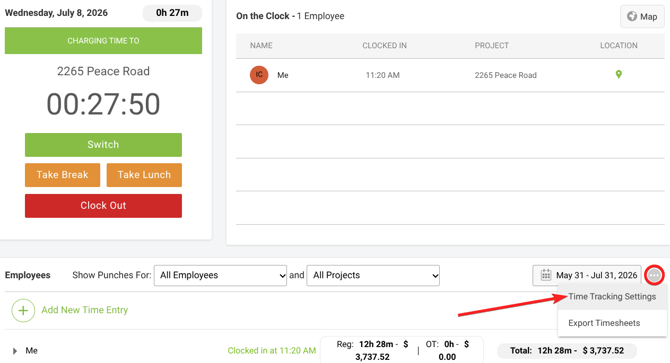
- This will open the Time Tracking Settings window.
- Select the Pay Rate Settings tab.

- This tab lists all Company Users and their current Pay Rate information: Default Pay Rate, OT Multiplier, OT Rate, and the number of configured Cost Code Pay Rates.
- For the employee whose Pay Rate settings you wish to copy, hover over the 3-dot Action Menu column in their row to reveal the gray 3-dot Action Menu, then click and select "Apply Pay Rates to Other Users" from the dropdown menu.
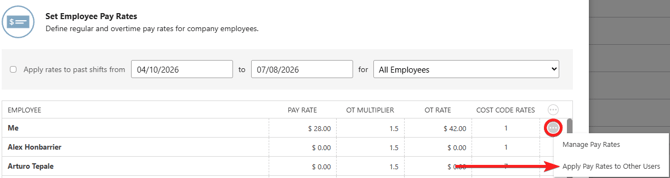
- This opens the Apply [Employee's Name]'s Pay Rates to Other Users window, displaying the source employee's default Pay Rate, OT Multiplier, OT Rate, and number of configured Cost Code Pay Rates.
- In the table below, check the box next to each employee who should receive the source employee's Pay Rate settings.
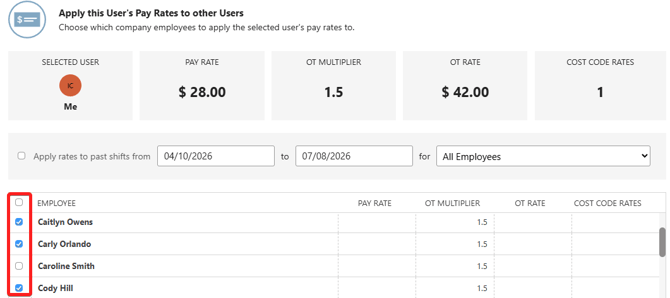
- You can also choose to apply the copied Pay Rates to employees' past shifts from this window.
- Press the blue "Save" button.
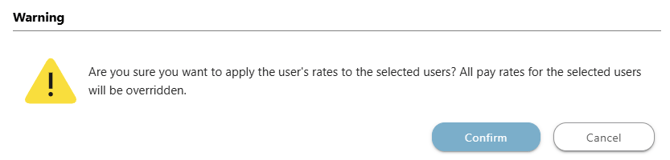
- ConstructionOnline will require double-verification to complete the override. Confirm your decision and apply the source employee's Pay Rate settings to the selected employee(s) by clicking the blue "Confirm" button.
ADDITIONAL INFORMATION
- Subscription Level: The Pay Rates feature is available for any active ConstructionOnline subscription with access to Time Tracking, whether included at the Business and Enterprise levels or as a Per-Company Add-On.
- Permissions: Select the option stating "User can view/manage pay rates for other users" to enable access for Company Users who should be able to set Pay Rates for Employees.
HAVE MORE QUESTIONS?
- If you need additional assistance, chat with a ConstructionOnline Specialist by clicking the orange Chat icon in the bottom left corner or visit the UDA Support Page for more options.