
BACKGROUND
Knowing your key contacts within each company is crucial for successful construction project management. Construction projects involve many stakeholders, and ConstructionOnline's company directory centralizes this information, eliminating reliance on scattered spreadsheets or outdated lists. The platform makes it easy to quickly identify and connect with the right personnel for any project need.
HOW TO ADD CONTACTS TO A COMPANY
A. During Company Creation:
- Contacts can be added to a Company during the Company creation process.
- Once within the "Create a New Company" extension blade that opens on the right side of your screen, navigate to the "Contacts" tab.

- Click the green (+) Add Contacts to Company button.
- Select how you would like to add the Contact(s) -
- Add from Your Contact List
- Add existing Contact(s) from your account's Company Contacts List by checking the box next to their name.
- Add Details Manually
- Add from Your Contact List
- Click the blue "Save" button to add the Contact(s) to the Company.
🗒️ Note: Manually adding the Contact's Details will prompt ConstructionOnline to search for an existing Contact identified by the provided email address. If no matching Contact is found within the system, a new Contact is created and added to your Company Contacts List.
B. From Within an Existing Company:
- From the "Companies" portion of your Company Directory, hover over the desired Company and press the blue "Details>" button.
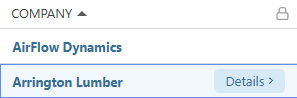
- This will open the Company's extension blade on the right side of your screen.
- Navigate to the "Contacts" tab.
- Follow Steps 3 - 5 from the section above.
🗒️ Note: Adding Contacts to a Company will not automatically populate or update the "Company" field within their Contact Details. This field is managed separately.
ADDITIONAL INFORMATION
- Subscription Level: The Company Directory is available for all ConstructionOnline subscriptions.
- Permissions: Admin Users and Company Users can add Contacts to Companies.
- CO™ Mobile App: Company Users can add Contacts to a Company via the ConstructionOnline Mobile App.
HAVE MORE QUESTIONS?
- Frequently asked questions (FAQ) about Companies can be found in the article FAQ: Companies.
- If you need additional assistance, chat with a ConstructionOnline Specialist by clicking the orange Chat icon in the bottom left corner or visit the UDA Support Page for more options.