
BACKGROUND
ConstructionOnline enables users to upload and centralize crucial permit documents using the "Attachments" tab within individual permits, ensuring secure storage and easy access. This functionality significantly enhances compliance, simplifies audits, and provides comprehensive records for accurate progress tracking and effective risk mitigation.
HOW TO ADD ATTACHMENTS TO A PERMIT
A. During Permit Creation:
- Attachments can be added to a permit during the permit creation process.
- Once within the "Add New Permit" extension blade that opens on the right side of your screen, navigate to the "Attachments" tab.

- Click the green (+) Add New Attachment button.

- Upload or drag-and-drop the files and/or photos pertinent to the permit.

- To finalize permit creation, select the blue "Create" button.
B. From within an Existing Permit:
- Navigate to the Permit Tracking feature.
- Hover over the desired permit and either press the blue "Details >" button or right-click and select "Edit."
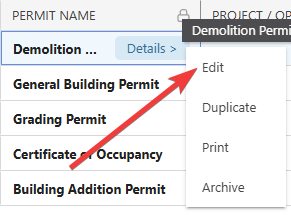
- Follow Steps 2-4 from the section above.
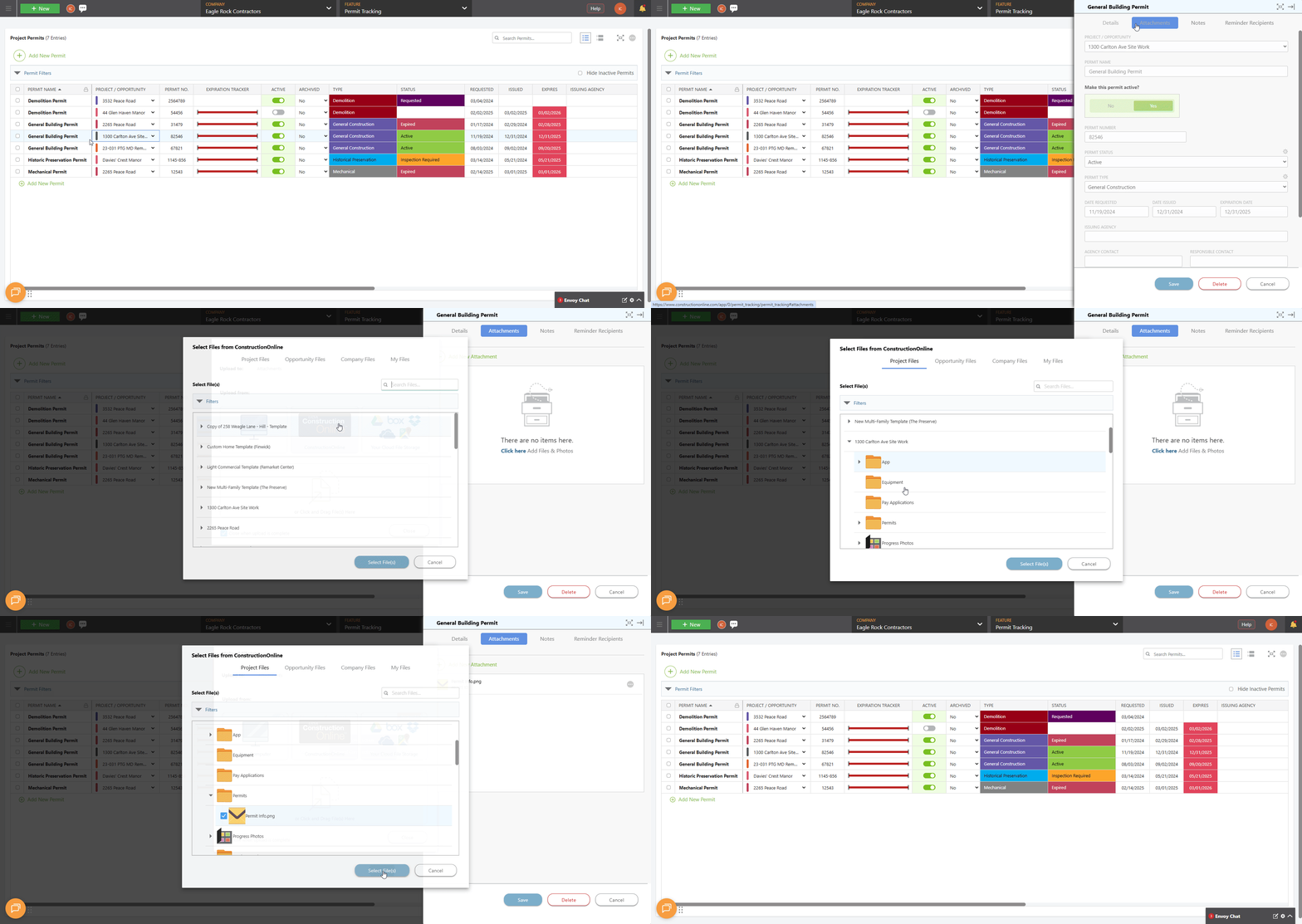
ALTERNATIVE ACCESS POINT
- From within the Permit Tracking feature, use the horizontal scroll bar to scroll within the "Project Permits" List until you can see the Attachments
 column.
 - Locate the desired permit in the List.
- Click into the Attachments column within the row associated with that permit to open to the permit's Attachment tab.
- Upload or drag-and-drop the files and/or photos pertinent to the permit.
- To finalize adding the Attachments to the permit, select the blue "Save" button.
ADDITIONAL INFORMATION
- Subscription Level: ConstructionOnline's OnGuard Permit Tracking feature is available for companies with current ConstructionOnline subscriptions at Team, Business, and Enterprise levels.
- Permit Tracking is also available as a Per-Company Add-On for all other plans.
- Permissions: Admin Users and Company Users with "Can Create, Edit, & Delete" permissions for Permits can add attachments to a permit.
- CO™ Mobile App: Users with the appropriate permissions can add attachments to permits via the ConstructionOnline Mobile App.
HAVE MORE QUESTIONS?
- Frequently asked questions (FAQ) about Permit Tracking can be found in the article FAQ: Permit Tracking.
- If you need additional assistance, chat with a ConstructionOnline Specialist by clicking the orange Chat icon in the bottom left corner or visit the UDA Support Page for more options.