
BACKGROUND
ConstructionOnline's industry-leading software for new home selections provides construction pros with intuitive, user-friendly tools for creating and managing comprehensive, online selection sheets that clients will love. To support a high level of detail, ConstructionOnline™ provides users with the option to add Notes to their Selections—a dedicated space to document additional information regarding the Selection and/or its respective Selection Choices.
STEPS TO ENTER NOTES FOR CLIENT SELECTIONS
- Navigate to the desired Project via the Left Sidebar.
- Click on the Financials tab and choose the Client Selections category.
- Scroll down to the Selections Details pane and find the Selection you wish to add Notes to.
- Right-click on the desired Selection and choose "Edit Selection" from the dropdown menu.
- Within the Edit Selection window, enter your Notes in the Selection Notes field.
- Finalize your changes by clicking the blue "Save Changes" button.
- If the Selection has already been "Approved," a pop-up message will appear asking you to confirm you would like to revert the Selection's status to "Pending" and notify your clients.
- By clicking "Save and Revert", you will save any Notes added to the Selection, revert it to a "Pending" status, and notify your clients the Selection is pending approval.
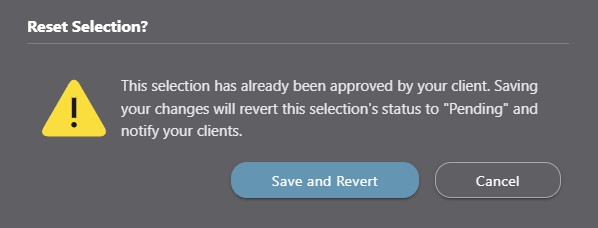
- By clicking "Save and Revert", you will save any Notes added to the Selection, revert it to a "Pending" status, and notify your clients the Selection is pending approval.
- Notes will populate within the Notes column of the Selection pane and can be pulled into All Selections Reports which serve as a summary report of all allowances and available selections for a project.
- If the Selection has already been "Approved," a pop-up message will appear asking you to confirm you would like to revert the Selection's status to "Pending" and notify your clients.
ADDITIONAL INFORMATION
- Notes can only be entered at the Selection level––not the Category or Selection Choice levels. More information about the different Client Selections levels can be found in Overview: What are Client Selections?
- Permissions: Only ConstructionOnline™ Company Users with “Can Create, Edit, & Delete” permissions can edit Selection details, including Notes.
- ClientLink™ and TeamLink™ Users cannot edit Selection Notes; however depending upon the ConstructionOnline™ Company's ClientLink™ / TeamLink™ Settings, they may have permission to view, approve, and/or create Selection Choices.
- Mobile App: Notes can be added to Selections through the ConstructionOnline™ Mobile App.
HAVE MORE QUESTIONS?
- Frequently asked questions (FAQ) about Client Selections can be found in the article FAQ: Client Selections.
- If you need additional assistance, chat with a Specialist by clicking the orange Chat icon located in the bottom left corner or visit the UDA support page for additional options.