
OBJECTIVE
To view Archived Projects in ConstructionOnline™
BACKGROUND
Archived Projects are conveniently stored separately from Active Company Projects in ConstructionOnline™ to improve organization and streamline accessibility. By archiving Company Projects upon completion, construction companies find it easy to maintain historical project records for future reference.
THINGS TO CONSIDER
- All Company Users have the ability to view all Company Projects, including Archived Company Projects, within ConstructionOnline™.
- A Company Project can only be archived by a Company Admin or the Project's Creator.
- Archived Projects can be "Activated" to restore full access or "Deleted" to permanently remove the Project and all associated files.
- Only a Company Admin or the specific Project's Creator is able to Activate an Archived Project or Delete an Archived Project.
- Archived Projects can be viewed through ConstructionOnline™ and CO™ Mobile.
STEPS TO VIEW ARCHIVED PROJECTS
A. From the Left Sidebar
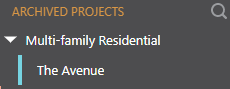
- Scroll to the bottom of the Projects List on the Left Sidebar
- Locate the Archived Projects sections
B. From the Company Overview
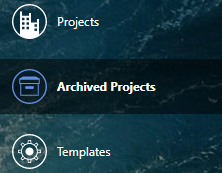
- Select Company Overview from the Left Sidebar

- Click the Company Projects tab

- Choose the Archived Projects category
HAVE MORE QUESTIONS?
- Frequently asked questions (FAQ) about Projects can be found in the article FAQ: Projects.
- If you need additional assistance, chat with a Specialist by clicking the orange Chat icon located in the bottom left corner or visit the UDA Support Page for additional options.