
BACKGROUND
As the industry's leading construction management platform, ConstructionOnline™ provides construction pros with powerful tools for managing & tracking construction projects. Intuitive Daily Logging tools streamline the process of creating construction daily logs & reports, and ConstructionOnline Company Users can also create custom Daily Log Reminders that prompt project team members to complete Daily Logs before leaving the job site. To ensure reminders stay up-to-date throughout the project, Daily Log Reminders can be edited or deleted at any time.
STEPS TO MANAGE DAILY LOG REMINDERS
- Navigate to the desired Project via the Left Sidebar.
- Select the Project Tracking tab, then choose the Daily Logging category.
- Click on the grey three dot action menu
 located in the upper-right corner of the Daily Logging pane.
 - Select the option Logging Reminders, then choose the Manage Reminders tab.
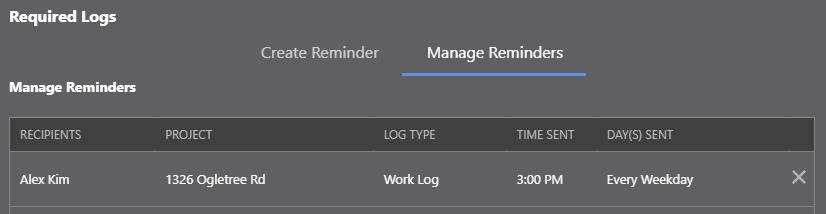
- Locate the specific Daily Log Reminder you would like to edit/delete.
- To edit the Reminder: click anywhere on the Reminder.
- This will automatically switch you to the "Create Reminder" tab, which will populate with the Reminder's pre-existing settings.
- Make any necessary edits.
- Click the blue Save button to finalize the new changes to your Daily Log Reminders.
- To delete the Reminder: click on the grey X located at the end of the Reminder.
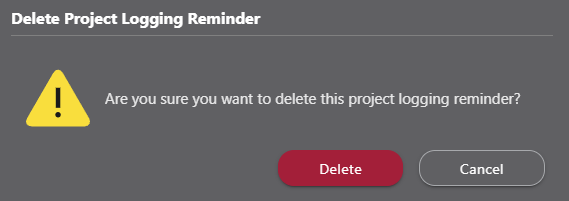
- After the "Delete Project Logging Reminder" pop-up message appears, click the red Delete button to confirm the deletion.
- Click the grey Cancel button to exit out of the Logging Reminders window.
- After the "Delete Project Logging Reminder" pop-up message appears, click the red Delete button to confirm the deletion.
- To edit the Reminder: click anywhere on the Reminder.
ADDITIONAL INFORMATION
- Permissions: Company Users must have Daily Logging permissions set as "Can Create, Edit, & Delete" to manage Daily Log Reminders.
- Mobile App: Daily Log Reminders can only be managed via browser access to ConstructionOnline. The ConstructionOnline Mobile App cannot be used to edit or delete Daily Log Reminders.
HAVE MORE QUESTIONS?
- Frequently asked questions (FAQ) regarding Daily Logs can be found in the FAQ: Daily Logs article.
- If you need additional assistance, chat with a Specialist by clicking the orange Chat icon located in the bottom left corner or visit the UDA support page for additional options.