
BACKGROUND
As an integral part of the industry's leading construction management software, ConstructionOnline™ Projects centralize and preserve the critical information related to individual construction jobs. Various Project Details are organized within Projects, including the Project's Currency. ConstructionOnline™ supports numerous default Currency Types that allow construction project teams to conduct business in a diverse group of countries around the world. Currency Types are set on a project-by-project basis, making it easy for construction project teams to conduct business and manage projects across borders.
STEPS TO SET PROJECT CURRENCY
- Navigate to the desired Project via the Left Sidebar.
- Click the Project Name in the top-center of the page.
- Select Edit Project Details from the dropdown menu.
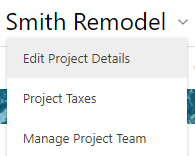
- Within the Project Details window, ensure you are in the Details tab.

- Choose your desired Currency from the Project Currency field.
- ConstructionOnline™ supports 88 different currency types.
- The option chosen here determines the options available within the Show Currency As field.
- Once you have selected your Project Currency, choose how you would like the Currency to appear within the Show Currency As field.
- Based on the Currency selected in the Project Currency field, ConstructionOnline™ will populate the respective Currency's symbol and international currency code for you to choose from within the Show Currency As field.
- For example: If selecting "USD" for your Project Currency, you can choose to show your currency as the dollar sign "$" or as the international currency code "USD" throughout your ConstructionOnline™ Project.

- For example: If selecting "USD" for your Project Currency, you can choose to show your currency as the dollar sign "$" or as the international currency code "USD" throughout your ConstructionOnline™ Project.
- Based on the Currency selected in the Project Currency field, ConstructionOnline™ will populate the respective Currency's symbol and international currency code for you to choose from within the Show Currency As field.
- Once you have finalized your Project Currency, click the blue "Save" button.
- The selected Currency will update immediately in your ConstructionOnline™ Project.
ADDITIONAL INFORMATION
- Permissions: All Company Users have the ability to Edit the Project Currency of Projects with a "Live" Project Status.
- Only Company Admins and Project Creators can Edit the Project Currency of Projects with a "Pending" Project Status.
- Mobile App: Project Currency can be set exclusively through browser access to ConstructionOnline™.
- The ability to set Project Currency is not accessible via CO™ Mobile.
HAVE MORE QUESTIONS?
- Frequently asked questions (FAQ) about Projects can be found in the article FAQ: Projects.
- If you need additional assistance, chat with a Specialist by clicking the orange Chat icon located in the bottom left corner or visit the UDA Support Page for additional options.