
OBJECTIVE
To add Sheets to Redline™ Takeoff
BACKGROUND
Manage your jobs efficiently with real-time collaboration based on the most up-to-date information available. Give everyone on your team - from foremen to architects to subs - centralized project plans, tasks, documents and more. Redline™ Takeoff gives you the tools you need to connect office and field, so you can build better, faster and smarter.
THINGS TO CONSIDER
- Company users must have a license to access Redline Takeoff.
- Review the Redline Sheet Requirements to ensure your plans are scanned correctly.
STEPS TO ADD SHEETS TO TAKEOFF
- Navigate to the desired Project via the Left Sidebar
- Select the Takeoff tab

- This will automatically open the Takeoff category
- Click on the green +Add New button
- Select Upload Plans
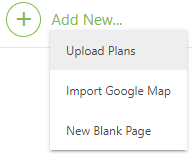
- This will open an Upload window
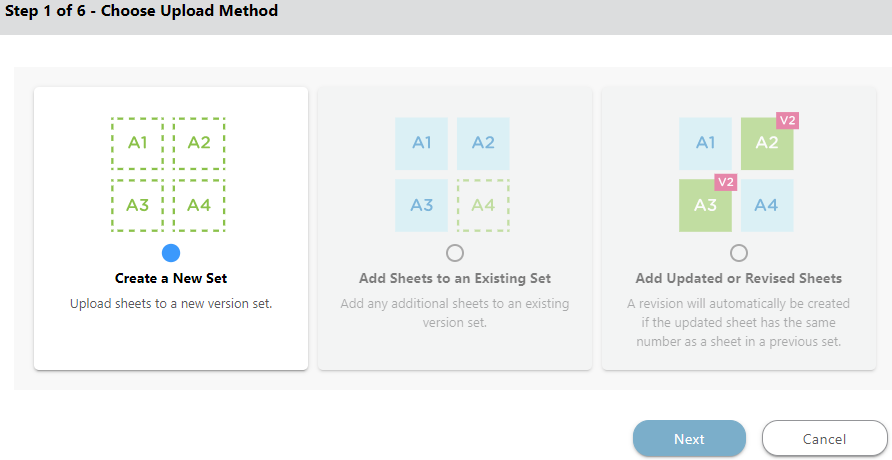
- Enter information for Steps 1-6
- Once uploaded, you will need to Review your Redline Sheets
HAVE MORE QUESTIONS?
- Frequently asked questions (FAQs) about Redline Takeoff can be found in the article FAQ: Redline Takeoff.
- If you need additional assistance, chat with a Specialist by clicking the orange Chat icon located in the bottom left corner or visit the UDA support page for additional options.