
BACKGROUND
ConstructionOnline's industry-leading construction estimating software gives construction companies a variety of flexible options to manage construction estimates and track company financial progress. With customizable lock/unlock functions for entire Estimates or selected Estimate fields, Company Users are able to manage access, control updates and ensure accuracy of OnCost™ Estimates in ConstructionOnline, keeping project financials protected from start to finish.
STEPS TO LOCK AN ESTIMATE
- Navigate to the desired Project via the Left Sidebar.
- Click the Financials tab which will automatically open the Estimating category.
- At the top right of the Estimate, click the gray three-dot Actions Menu.
- Hover over Estimate Options then select Estimate Options from the dropdown menu.
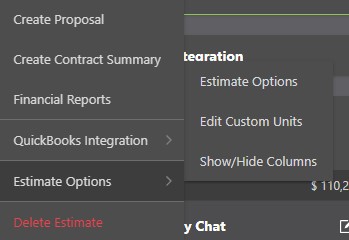
- Within the Estimate Options window, navigate to the Lock Estimate tab.

- Choose what items to lock in for the current Estimate by selecting the checkbox next to the field to enable lock.
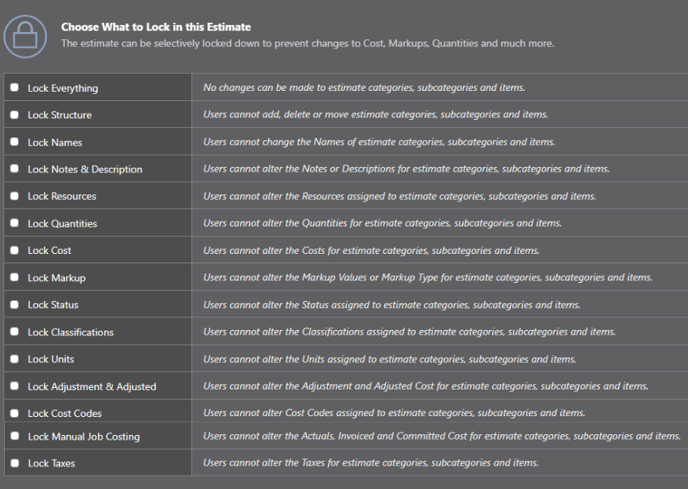
- Selecting the Lock Everything option automatically selects all following fields and prevents any changes being made to the Estimate.
- Fields can be unlocked by unchecking the box next to each field name to disable lock.
- To finalize changes and close the Estimate Options window, click the blue "Save" button in the bottom right-hand corner.
ADDITIONAL INFORMATION
- Once an Estimate field is "locked," edits cannot be made to that field within the Estimate, and the field must be "unlocked" to restore editing capabilities.
- Changes made within the Estimate Options window, such as Locking/Unlocking Estimate Items, are unique to the current Estimate and do not apply to other Project Estimates, Opportunity Estimates, or Project Templates.
- Permissions: Only ConstructionOnline™ Company Users with Estimating permissions set to “Can Create, Edit, & Delete” can Lock/Unlock Estimate fields and/or an Estimate itself.
- ClientLink/TeamLink Access: OnCost™ Estimating is not accessible via the ClientLink™ or TeamLink™ Portal.
- Mobile App: Locking/Unlocking an Estimate is exclusively available via browser access to ConstructionOnline. Estimates are presented in View-Only Mode on the ConstructionOnline Mobile App.
HAVE MORE QUESTIONS?
- Frequently asked questions (FAQ) regarding OnCost Estimating can be found in the FAQ: Estimating article.
- If you need additional assistance, chat with a Specialist by clicking the orange Chat icon located in the bottom left corner or visit the UDA support page for additional options.