
OBJECTIVE
To favorite a Project in ConstructionOnline™
BACKGROUND
ConstructionOnline™ Projects centralize the management of critical information for individual construction jobs, making it easy for construction project teams to find specific projects at any moment. With the ability to favorite a projects that are accessed frequently, it can be much easier to locate and organize active company projects.
THINGS TO CONSIDER
- All Company Users have the ability to Favorite Projects from Projects Set to Live.
- Company Admins and Project Creators can Favorite Projects from Projects Set to Pending.
- If you are unsure if a Project is Set to Pending or Live, the Project Status can be Set/Edited from the Edit Project Details.
- Favoriting a project will not remove it from the PROJECTS BY TYPE section on the Left Sidebar
- Favoriting a project creates a second location to quickly access your most frequented projects.
- Favoriting a Project can be done exclusively through ConstructionOnline™. The ability to Favorite a Project is not accessible via CO™ Mobile.
STEPS TO FAVORITE A PROJECT
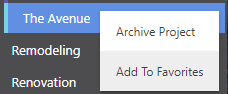
- Locate the desired Project via the Left Sidebar
- Right-click on the desired Project
- Select Add To Favorites
HAVE MORE QUESTIONS?
- Frequently asked questions (FAQ) about Projects can be found in the article FAQ: Projects.
- If you need additional assistance, chat with a Specialist by clicking the orange Chat icon located in the bottom left corner or visit the UDA Support Page for additional options.