
BACKGROUND
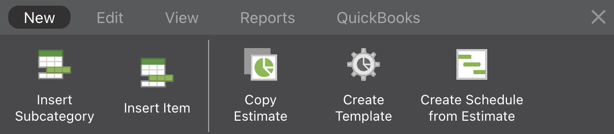
With the power of ConstructionOnline's construction estimating software, OnCost™ Estimating, construction pros can build construction cost estimates with ease & efficiency. Within each estimate in ConstructionOnline is the Estimating Toolbar, which serves as a convenient hub for important Estimate actions and tasks. Using the Estimating Toolbar, Company Users can quickly access important estimate actions for a more streamlined approach of managing Estimates & Estimate Templates.
STEPS TO SHOW/HIDE THE ESTIMATING TOOLBAR
- Navigate to the desired Project via the Left Sidebar.
- Select the Financials tab to automatically open the Estimating category.
- To show the Toolbar, click on the brick icon located next to the Column View dropdown menu.

- To hide the Toolbar, click the grey X icon located in the top left corner of the Toolbar.
ADDITIONAL INFORMATION
- Different Estimate Types (3-level vs. 2-level) and sheet types (e.g. Category sheet) will have different actions available within the Toolbar. For example, on the Project Totals sheet for a 3-level estimate, there is no option to "Insert Item". This action is only available for a Category sheet.
- The Estimating Toolbar can also be show/hidden within Opportunity Estimates and Estimate Templates.
- If the Estimating Toolbar is hidden within a certain Estimate, the Toolbar will be hidden for ALL other Estimates within a Company User's account. The Toolbar will remain hidden until the Company User decides to show the Toolbar again.
- The Estimating Toolbar is user-specific—each Company User can control if the Estimating Toolbar is shown or hidden for Estimates within their account.
- Permissions: Company Users must have Estimating Permissions set as "Can Create, Edit, & Delete" to show/hide the Estimating Toolbar.
- The Estimating Toolbar is exclusively available via browser access to ConstructionOnline. Estimates are presented in View-Only Mode on the ConstructionOnline Mobile App.
HAVE MORE QUESTIONS?
- Frequently asked questions (FAQ) regarding OnCost Estimating can be found in the FAQ: Estimating article.
- If you need additional assistance, chat with a Specialist by clicking the orange Chat icon located in the bottom left corner or visit the UDA support page for additional options.