
OBJECTIVE
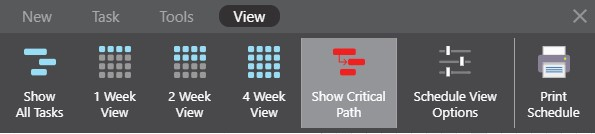
To show or hide the Critical Path in a Schedule in ConstructionOnline.
BACKGROUND
Using Predecessors maximizes Schedule efficiency. You will often have a string of Tasks dependent on each other, creating a Critical Path. The Critical Path is considered to be the string of Tasks that are absolutely necessary for the completion of the Project.
THINGS TO CONSIDER
- You must have Tasks linked with Predecessors in order to have a Critical Path.
STEPS TO SHOW/HIDE CRITICAL PATH IN A SCHEDULE
- Navigate to the desired Project via the Left Sidebar
- Select the Calendars & Schedules tab
- Highlight the Task you wish to convert to a Group
- Choose the Scheduling category
- Click the Toolbar icon at the top right of the Schedule Gantt Progress pane

- In the View tab, select Show/Hide Critical Path
HAVE MORE QUESTIONS?
- Frequently asked questions (FAQ) regarding OnPlan Scheduling can be found in the FAQ: Scheduling article.
- If you need additional assistance, chat with a Specialist by clicking the orange Chat icon located in the bottom left corner or visit the UDA support page for additional options.