![CO_logo_square.svg]](https://help.constructiononline.com/hubfs/CO_logo_square.svg)
OBJECTIVE
To rename Files & Photos, as well as Albums & Folders, in ConstructionOnline™
BACKGROUND
We understand how important it is to be able to make changes to the text in a Word doc or make a quick mark up on a photo while in the field! ConstructionOnline™ make it easy to edit text documents with our fully-featured text editor - right inside ConstructionOnline™. Project photos can also be marked up, cropped, rotated and more with our built-in photo editor. Renaming photos and files can be beneficial when organizing and sharing them with others.
THINGS TO CONSIDER
- Administrators and Company Users with Permission rename files and photos.
- Files and photos can be renamed within both ConstructionOnline and the ConstructionOnline Mobile App.
STEPS TO RENAME A FILE/PHOTO
- Navigate to Company Files, My Files, or a Project via the Left Sidebar
- Select the Files tab if you're in a Project
-
Right-click on the desired File/Photo, or Album/Folder
- Select Rename from the dropdown menu
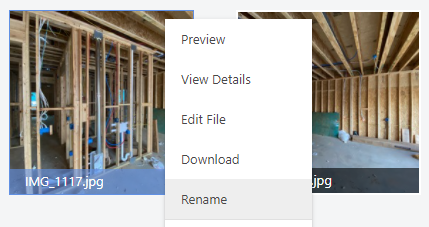
- The name will become highlighted
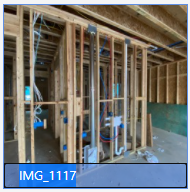
- Make changes and hit Enter
HAVE MORE QUESTIONS?
- Frequently asked questions (FAQ) about Files & Photos can be found in the article FAQ: Files & Photos.
- If you need additional assistance, chat with a Specialist by clicking the orange Chat icon located in the bottom left corner or visit the UDA support page for additional options.