![CO_logo_square.svg]](https://help.constructiononline.com/hubfs/CO_logo_square.svg)
OBJECTIVE
To hide Leads in your ConstructionOnline Contacts list
BACKGROUND
Contacts within ConstructionOnline are referred to as Users, and are divided into 5 categories: Company Employees, TeamLink Users, ClientLink Users, Leads & Basic Users. A first name, last name, and email address are required information for adding a user.
THINGS TO CONSIDER
- Badges will appear beside Contact names in your Company Contacts list to denote whether they are a Company user, Company Admin, ClientLink user, TeamLink user or Lead
STEPS TO HIDE LEADS IN YOUR CONTACT LIST
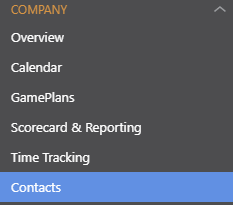
- Navigate to Contacts via the Left Sidebar
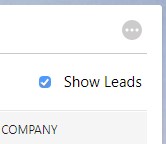
- Uncheck the box beside Show Leads in the top right of your Contacts list
- Check this box if you wish to show Leads again
HAVE MORE QUESTIONS?
- Frequently asked questions (FAQ) regarding Contacts can be found in the FAQ: Contacts article.
- If you need additional assistance, chat with a Specialist by clicking the orange Chat icon located in the bottom left corner or visit the UDA support page for additional options.