![CO_logo_square.svg]](https://help.constructiononline.com/hubfs/CO_logo_square.svg)
OBJECTIVE
To filter your Lead Calendar by Sales Rep in ConstructionOnline
BACKGROUND
There are many steps that go into securing a lead and turning that lead into a client. Being able to manage your lead events separate from other company events allows those individuals dedicated to sales the ability to focus on exactly what is most important – closing deals and building your company’s success.
THINGS TO CONSIDER
- The Lead Calendar in ConstructionOnline shows Lead Events only.
- Lead Events can also be seen on the ConstructionOnline Company Calendar.
STEPS TO FILTER YOUR LEAD CALENDAR BY SALES REP
- Navigate to Lead Tracking via the Left Sidebar
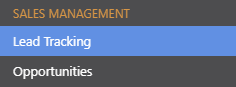
- Select the Lead Calendar category

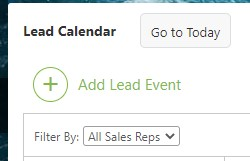
- Select the desired Sales Rep from the Filter By dropdown menu in the top left of the Calendar
HAVE MORE QUESTIONS?
- Frequently asked questions (FAQ) about Leads & Lead Tracking can be found in the article FAQ: Lead Tracking.
- If you need additional assistance, chat with a Specialist by clicking the orange Chat icon located in the bottom left corner or visit the UDA Support Page for additional options.