
OBJECTIVE
To export Leads to Excel from ConstructionOnline.
STEPS TO EXPORT LEADS TO EXCEL
- Navigate to Lead Tracking via the Left Sidebar

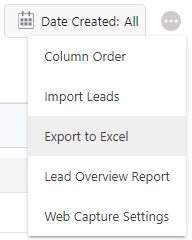
- Click the gray 3-Dot Action menu at the top right of the Leads pane

- Select Export to Excel from the dropdown menu
- This will open the Lead Export Settings window

- Choose the Lead information to include in the report
- Click Save
- The Excel file will automatically download to your computer
HAVE MORE QUESTIONS?
- Frequently asked questions (FAQ) about Leads & Lead Tracking can be found in the article FAQ: Lead Tracking.
- If you need additional assistance, chat with a Specialist by clicking the orange Chat icon located in the bottom left corner or visit the UDA Support Page for additional options.