
OBJECTIVE
To edit a Lead in ConstructionOnline.
BACKGROUND
Successfully building strong relationships with potential clients requires attention to detail. ConstructionOnline provides you a location to manage these details and track a Lead from initial communication to sales fulfilment in Lead Tracking.
THINGS TO CONSIDER
- ConstructionOnline considers a Lead a type of Contact, so while Leads are stored independently in Lead Tracking, they're also visible on the Contacts page.
- Some fields are customizable, allowing you to add, edit, or remove categories. These fields will be indicated by the gear icon

- The order in which Leads appear can be adjusted by clicking on the column headers.
STEPS TO EDIT A LEAD
- Navigate to Lead Tracking via the Left Sidebar
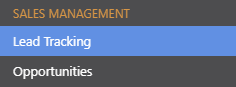
- This will open the Lead Pipeline category
- Right-click on the desired Lead
- Select Edit from the dropdown menu
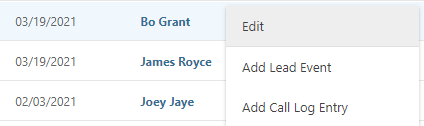
- This will open the Edit Lead window

- Make desired changes:
- General Information: Edit the Lead's Name, Email, Company, & other General Information.
- Lead Details: Organize your Lead by Status, Stage, Source, and more.
- Lead Events: Add Meetings & Calls with your Lead.
- Opportunities: Relate a Project Opportunity with your Lead.
- Attachments: Attach Files/Photos to your Lead
- Click Save
HAVE MORE QUESTIONS?
- Frequently asked questions (FAQ) about Leads & Lead Tracking can be found in the article FAQ: Lead Tracking.
- If you need additional assistance, chat with a Specialist by clicking the orange Chat icon located in the bottom left corner or visit the UDA Support Page for additional options.